On Wed, 12/18/2024 5:06 PM, sticks wrote:
On 12/18/2024 3:58 PM, Bill Bradshaw wrote:
I update my Win 10 computers with a cumulative update file and did not
notice one of the computers had not successfully updated since April 2024. >> I should of been checking the updates listing and I would have seen this.
The computer is stuck at 19045.5011. It appears this started with the
installation of KB5001716. I have been working on this on and off for the >> 10 days. I used MediaCreationTool_22H2 to create a USB Flash drive and ran >> that and got a message the computer was up to date. I did make a Macrium >> image backup so I can restore the computer to its broken state. I am going >> to use MediaCreation on one of the good computers to create a Flash drive
and try that with the hope I do not have to use my Macrium backup. Any >> suggestions?
You didn't say if KB5001716 failed or not. Are there other KB updates that too have failed.
Here's the usual stuff you might have tried and that winston generally recommends.
<https://www.partitionwizard.com/news/kb5001716-fails-to-install.html>
Yet another SafeOS update perhaps.
https://answers.microsoft.com/en-us/windows/forum/all/install-error-0x80070643-windows-10-version-21h2/ca8dc95f-bc48-427b-aa6a-3ef468f61ca0
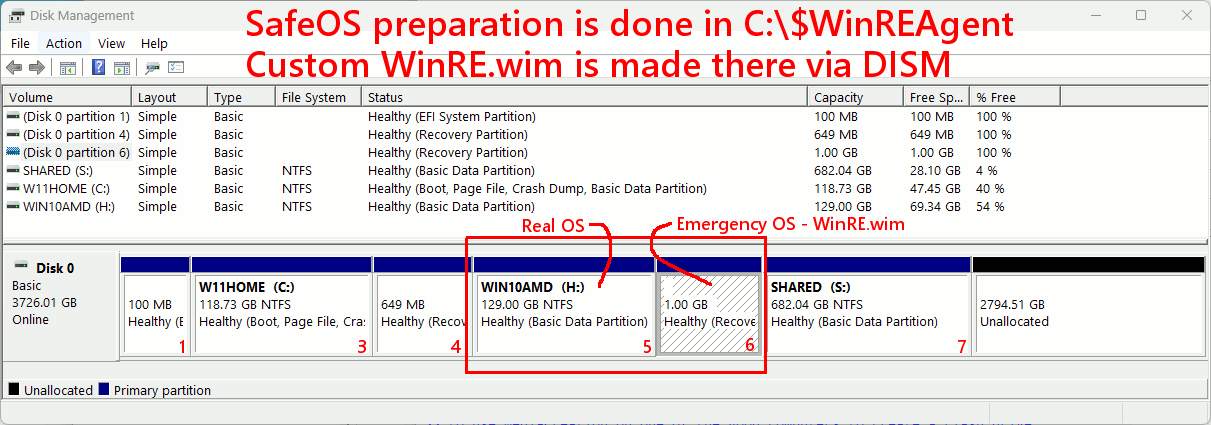
Here is a picture as an example:
[Picture]
https://i.postimg.cc/wjk2v7p0/Win10-Safe-OS-Recovery-Partition-Win-RE-WIM.gif
I'm not booted into Windows 10 at the moment, but I keep two OSes on
the disk drive. And both happen to have Emergency OS images (hidden, can't see them).
First of all, don't panic if yours does not look like that.
There are at least three possible partition layouts, and I
generally don't hunt through the room and take pictures of
all three. I'm not organized enough for that :-)
On a W10-over-W7 installation, the partition with the WinRE.wim
could be to the left of the OS partition.
It's even possible for an OS to not have a "second partition". The
SafeOS image in that case, lives inside the C: partition.
Similarly, when the SafeOS image is "retracted and out of harms way",
it is also stored inside the C: drive. In fact, there is a very
complex set of possibilities, for what happened to your WinRE.wim
file. One of the possibilities is not documented, but I caught
a glimpse of it here.
You will notice in the picture, the size of the SafeOS partition is
bigger than normal. The update they keep trying to stuff in there
(started with '4441 a while back), it actually needs "more than double
the original space". To cover off all possibilities, you could for
example make it 2GB in size.
On your disk, there could be MSDOS partitioning, rather than the
GPT partitioning on my disk drive. Sometimes, this can make
resizing the partition easier. I can generally fix that partition,
using gparted in Linux. If I use Paragon Partition Manager 14 Free,
which only has Move/Resize capability, sometimes it whines about
not being able to do things. The GPT partitions, are not really
file system specifications, and while the MSDOS partition number
is 0x27 (Hidden NTFS), the GPT one is "Recovery Partition", and
a number of file systems can be stuffed in there. The file system
happens to be NTFS, but the "Hidden" nature of the partition
is influenced by the GPT behaviors. Whereas it is more of a file
system level thing, in an MSDOS 0x27 case (where you only expect
NTFS to be in there, and ExFAT is not a possibility).
*******
anyway, with the vast color commentary out of the way:
reagentc /info
will dump some information about your emergency OS. If you do
bcdedit
the emergency OS receives a reference in there, too. Not that it matters.
reagentc /info
Windows Recovery Environment (Windows RE) and system reset configuration Information:
Windows RE status: Enabled
Windows RE location: \\?\GLOBALROOT\device\harddisk0\partition4\Recovery\WindowsRE
My current booted OS, uses partition4. The Windows 10 OS on mine, uses partition6.
That's an armed and functional SafeOS, for when C: is corrupted or is
not accessible because C: is encrypted.
When reagentc is "Enabled", the WinRE.wim file is in its final resting
place. When reagentc is "Disabled", the WinRE.wim is moved, to one
of a couple locations.
When KB5001716 attempts to do yet another update, to WinRE.wim,
it is manufactured in C:\$WinREAgent . If you see a multitude of folders
inside there, it means you are "mid-install" and something is likely
looping and doing occasional retries. When the folder is mostly
clean (and especially after a SafeOS install finishes), the folder
is cleaned up. And the total size will be quite small and not a
gigabyte of crap in there. Yours is stuck right now, and we don't
interfere with it.
The algorithm then, is like using a chum bucket. You pour bait
over the side of the boat, in the hopes of "attracting an update" :-)
There *IS* a way to force the issue. We *CAN* give it a whack,
but we then need to fetch a file from a Win10 installer DVD,
and that is more complexity than most fishermen are willing
to resort to.
Originally, the 0x80070643 error that these update(s) throw, is
some sort of download error. Unfortunately, the staff lack imagination,
and the actual multiple failure reasons, all produce the same error
number.
The SafeOS update nominally runs out of space. If you resize
the partition, occasionally that works.
The "suggested" procedure is to *delete* the old partition
and make a new one. Now, your balls are too the wall. You're
all in as it were, and are making a significant investment.
I don't particularly like doing this -- sure, I did the procedure
the first time, it all worked out and so on, but this is hardly
a way to run a snack bar. It's too much work. It scares people.
Of course, it all scares people. It's all relative.
What happens in some cases, is when the patch does
reagentc /disable
so it can work in there, instead of the old WinRE.wim file being
preserved in a hidey hole on D: , the twits store the old one
in a folder off to the side, inside the Recovery Partition. Now,
there cannot possibly be space to store the new WinRE.wim and the
attempt of course, fails. Making the partition 2GB in size,
covers for this possibility. Making the partition only 250MB
bigger than it used to be, covers the "proper" case, where the
old WinRE.wim is temporarily stored on C: .
While some articles refer to this Registry key, Microsoft is
simply incapable of not stepping in pooh. I installed 24H2 Win11
on the other machine, via Windows Update invitation, and the
installation procedure did NOT properly document the SafeOS. Most of
the time, users find this registry key is not defined. There is
hardly ever a reason for manually creating one of these.
HKEY_LOCAL_MACHINE\SOFTWARE\Microsoft\Windows NT\CurrentVersion
WinREVersion Reg_SZ 10.0.19041.3920 <=== If '4441 had worked
If you were to do a Repair Install of the OS (one of our favorite
techniques as a Plan B for users who are fearful of this level
of modification, which I can fully understand), the Repair Install
does not have the logic to do anything clever with respect of
that partition. Similarly, the idiotic Windows Update patches
are similarly NOT EQUIPPED to fix the partition, which is why
this procedure KEEPS FAILING. What we learn from this,
is it is yet another GroundHog Day Patch from Microsoft, it
jams up your Windows Update state, the nitwits can't fix it
from their end, that leaves US HOLDING THE BAG of pooh.
There is one other root cause for the failure. This is not the
default for Windows, but I run this way. The WinRE.wim compression
step fails, if you have done this.
fsutil behavior query disableCompression
DisableCompression = 1 (Compression is DISABLED) <=== I run with compression turned off
If I set the DisableCompression back to 0, then a '4441 update succeeds.
That is the reason, the one of those trying to install on my
Windows 11 right now, it can't get in :-) Because of my setting.
Summary: Most of the time, resizing the SafeOS partition (whether
it is to the left of C: partition or to the right of C: partition),
is sufficient for the update to run on a Retry. Disk Management
can resize C: -- it can do a "Shrink", but Disk Management
lacks the ability to move the Recovery Partition into the
space created by shrinking some other partition. Using
a tool like PM14 Free, as described above, may give the
ability to deal with the thing. Partition Managers (Linux gparted
included), work best if move/resize partition candidates contain
a valid file system. The tiny Microsoft Reserved (partition 2 in my
picture, Disk Management will not show it) adds extra
abuse for the user, as it prevents some tools from helping you.
So while the "cure" is (most of the time) to resize the place
where the WinRE.wim is stored (reagentc /info), depending on your
tools and the situation, it can be more difficult than you would
suspect.
Provide a picture or a description of your Disk Management situation,
if you need more specific advice.
Paul
--- SoupGate-Win32 v1.05
* Origin: fsxNet Usenet Gateway (21:1/5)