• Can you get the Irfanview "copy video frame to clipboard" to work?

    From Oliver@21:1/5 to All on Mon Nov 18 14:13:04 2024
    XPost: alt.comp.os.windows-11, rec.photo.digital

    Can you get the Irfanview "save video frame to clipboard" to work?

    Loooooong story short, can you get Irfanview to save a video frame to the Windows clipboard? (Not the borders. Not the screen. Just the video frame.)

    This "should" put the frame into the clipboard but it does not work for me.
    a. Copy your video to be cropped to "in.mp4" to the current directory
    b. Rightclick on in.mp4, which will bring up a Windows context menu
    c. Select "Open with > Irfanview" (which will be 32-bit or 64-bit)
    d. That should start playing the in.mp4 video inside of Irfanview
    e. Freeze Irfanview at a desired frame by leftmouse clicking once
    f. Rightclick in the frozen Irfanview window (which pops up a menu)
    g. From the menu, select "Copy current frame to clipboard - Ctrl+C"

    This also should put the frame into the clipboard, but does not work for me.
    a. Open your video in VLC & select VLC:Video > Take snapshot"
    b. That saves a frame to C:\Users\you\Pictures\vlcsnap-<datetime>.png
    c. Open that VLC framegrab PNG in Irfanview
    d. Irfanview:Options > Capture Screenshot
    e. Select "Foreground Window" & "Copy captured image to clipboard"

    The test if the screenshot is in the clipboard is this will work:
    @echo off
    REM framecrop.bat
    REM 1st Open a command window
    REM 2nd execute this file (which puts the clipboard in Irfanview)
    REM 3rd In Irfanview, leftmouse draw the desired selection box
    REM 4th In Irfanview, press "Shift+c"
    REM 5th Click the Irfanview [Save values and exit] button
    REM 6th Kill Irfanview (this spits out the desired ffmpeg crop command)

    start /w "" C:\path-to\Irfanview\i_view32.exe /clippaste

    for %%k in (CustSelX CustSelY CustSelW CustSelH) do (
    for /f "delims=." %%i in ('find "%%k=" ^<C:\path-to\Irfanview\i_view32.ini') do set %%i
    )

    echo ffmpeg -i in.mp4 -vf "crop=%CustSelX%:%CustSelY%:%CustSelW%:%CustSelH%" -c:a copy out.mp4

    If that works above, can you explain HOW you got the video frame
    into the Windows clipboard using just Irfanview to do it?
    --
    This message ID <vhg973$1e2eg$[email protected]> has the background details. https://www.novabbs.com/computers/article-flat.php?id=82889&group=alt.comp.os.windows-10#82889

    --- SoupGate-Win32 v1.05
    * Origin: fsxNet Usenet Gateway (21:1/5)
  • From MikeS@21:1/5 to Oliver on Mon Nov 18 21:43:46 2024
    XPost: alt.comp.os.windows-11, rec.photo.digital

    On 18/11/2024 21:13, Oliver wrote:
    Can you get the Irfanview "save video frame to clipboard" to work?

    Loooooong story short, can you get Irfanview to save a video frame to
    the Windows clipboard? (Not the borders. Not the screen. Just the video frame.)

    This "should" put the frame into the clipboard but it does not work for me. a. Copy your video to be cropped to "in.mp4" to the current directory
    b. Rightclick on in.mp4, which will bring up a Windows context menu
    c. Select "Open with > Irfanview" (which will be 32-bit or 64-bit)
    d. That should start playing the in.mp4 video inside of Irfanview
    e. Freeze Irfanview at a desired frame by leftmouse clicking once
    f. Rightclick in the frozen Irfanview window (which pops up a menu)
    g. From the menu, select "Copy current frame to clipboard - Ctrl+C"

    This also should put the frame into the clipboard, but does not work for
    me.
    a. Open your video in VLC & select VLC:Video > Take snapshot" b. That
    saves a frame to C:\Users\you\Pictures\vlcsnap-<datetime>.png
    c. Open that VLC framegrab PNG in Irfanview
    d. Irfanview:Options > Capture Screenshot e. Select "Foreground Window"
    & "Copy captured image to clipboard"

    The test if the screenshot is in the clipboard is this will work:
    @echo off
    REM framecrop.bat
    REM 1st Open a command window
    REM 2nd execute this file (which puts the clipboard in Irfanview)
    REM 3rd In Irfanview, leftmouse draw the desired selection box REM 4th
    In Irfanview, press "Shift+c"
    REM 5th Click the Irfanview [Save values and exit] button
    REM 6th Kill Irfanview (this spits out the desired ffmpeg crop command)

    start /w "" C:\path-to\Irfanview\i_view32.exe /clippaste

    for %%k in (CustSelX CustSelY CustSelW CustSelH) do (
       for /f "delims=." %%i in ('find "%%k=" ^<C:\path-to\Irfanview\i_view32.ini') do set %%i
       )

    echo  ffmpeg -i in.mp4 -vf "crop=%CustSelX%:%CustSelY%:%CustSelW%:%CustSelH%" -c:a copy out.mp4

    If that works above, can you explain HOW you got the video frame
    into the Windows clipboard using just Irfanview to do it?

    Answering the title of your post, no idea what the rest of it is about.
    Yes.

    --- SoupGate-Win32 v1.05
    * Origin: fsxNet Usenet Gateway (21:1/5)
  • From knuttle@21:1/5 to All on Mon Nov 18 19:34:53 2024
    XPost: alt.comp.os.windows-11, rec.photo.digital

    T24gMTEvMTgvMjAyNCA0OjEzIFBNLCBPbGl2ZXIgd3JvdGU6DQo+IENhbiB5b3UgZ2V0IHRo ZSBJcmZhbnZpZXcgInNhdmUgdmlkZW8gZnJhbWUgdG8gY2xpcGJvYXJkIiB0byB3b3JrPw0K PiANCj4gTG9vb29vb25nIHN0b3J5IHNob3J0LCBjYW4geW91IGdldCBJcmZhbnZpZXcgdG8g c2F2ZSBhIHZpZGVvIGZyYW1lIHRvIA0KPiB0aGUgV2luZG93cyBjbGlwYm9hcmQ/IChOb3Qg dGhlIGJvcmRlcnMuIE5vdCB0aGUgc2NyZWVuLiBKdXN0IHRoZSB2aWRlbyANCj4gZnJhbWUu KQ0KPiANCj4gVGhpcyAic2hvdWxkIiBwdXQgdGhlIGZyYW1lIGludG8gdGhlIGNsaXBib2Fy ZCBidXQgaXQgZG9lcyBub3Qgd29yayBmb3IgbWUuDQo+IGEuIENvcHkgeW91ciB2aWRlbyB0 byBiZSBjcm9wcGVkIHRvICJpbi5tcDQiIHRvIHRoZSBjdXJyZW50IGRpcmVjdG9yeQ0KPiBi LiBSaWdodGNsaWNrIG9uIGluLm1wNCwgd2hpY2ggd2lsbCBicmluZyB1cCBhIFdpbmRvd3Mg Y29udGV4dCBtZW51DQo+IGMuIFNlbGVjdCAiT3BlbiB3aXRoID4gSXJmYW52aWV3IiAod2hp Y2ggd2lsbCBiZSAzMi1iaXQgb3IgNjQtYml0KQ0KPiBkLiBUaGF0IHNob3VsZCBzdGFydCBw bGF5aW5nIHRoZSBpbi5tcDQgdmlkZW8gaW5zaWRlIG9mIElyZmFudmlldw0KPiBlLiBGcmVl emUgSXJmYW52aWV3IGF0IGEgZGVzaXJlZCBmcmFtZSBieSBsZWZ0bW91c2UgY2xpY2tpbmcg b25jZQ0KPiBmLiBSaWdodGNsaWNrIGluIHRoZSBmcm96ZW4gSXJmYW52aWV3IHdpbmRvdyAo d2hpY2ggcG9wcyB1cCBhIG1lbnUpDQo+IGcuIEZyb20gdGhlIG1lbnUsIHNlbGVjdCAiQ29w eSBjdXJyZW50IGZyYW1lIHRvIGNsaXBib2FyZCAtIEN0cmwrQyINCj4gDQo+IFRoaXMgYWxz byBzaG91bGQgcHV0IHRoZSBmcmFtZSBpbnRvIHRoZSBjbGlwYm9hcmQsIGJ1dCBkb2VzIG5v dCB3b3JrIGZvciANCj4gbWUuDQo+IGEuIE9wZW4geW91ciB2aWRlbyBpbiBWTEMgJiBzZWxl Y3QgVkxDOlZpZGVvID4gVGFrZSBzbmFwc2hvdCIgYi4gVGhhdCANCj4gc2F2ZXMgYSBmcmFt ZSB0byBDOlxVc2Vyc1x5b3VcUGljdHVyZXNcdmxjc25hcC08ZGF0ZXRpbWU+LnBuZw0KPiBj LiBPcGVuIHRoYXQgVkxDIGZyYW1lZ3JhYiBQTkcgaW4gSXJmYW52aWV3DQo+IGQuIElyZmFu dmlldzpPcHRpb25zID4gQ2FwdHVyZSBTY3JlZW5zaG90IGUuIFNlbGVjdCAiRm9yZWdyb3Vu ZCBXaW5kb3ciIA0KPiAmICJDb3B5IGNhcHR1cmVkIGltYWdlIHRvIGNsaXBib2FyZCINCj4g DQo+IFRoZSB0ZXN0IGlmIHRoZSBzY3JlZW5zaG90IGlzIGluIHRoZSBjbGlwYm9hcmQgaXMg dGhpcyB3aWxsIHdvcms6DQo+IEBlY2hvIG9mZg0KPiBSRU0gZnJhbWVjcm9wLmJhdA0KPiBS RU0gMXN0IE9wZW4gYSBjb21tYW5kIHdpbmRvdw0KPiBSRU0gMm5kIGV4ZWN1dGUgdGhpcyBm aWxlICh3aGljaCBwdXRzIHRoZSBjbGlwYm9hcmQgaW4gSXJmYW52aWV3KQ0KPiBSRU0gM3Jk IEluIElyZmFudmlldywgbGVmdG1vdXNlIGRyYXcgdGhlIGRlc2lyZWQgc2VsZWN0aW9uIGJv eCBSRU0gNHRoIA0KPiBJbiBJcmZhbnZpZXcsIHByZXNzICJTaGlmdCtjIg0KPiBSRU0gNXRo IENsaWNrIHRoZSBJcmZhbnZpZXcgW1NhdmUgdmFsdWVzIGFuZCBleGl0XSBidXR0b24NCj4g UkVNIDZ0aCBLaWxsIElyZmFudmlldyAodGhpcyBzcGl0cyBvdXQgdGhlIGRlc2lyZWQgZmZt cGVnIGNyb3AgY29tbWFuZCkNCj4gDQo+IHN0YXJ0IC93ICIiIEM6XHBhdGgtdG9cSXJmYW52 aWV3XGlfdmlldzMyLmV4ZSAvY2xpcHBhc3RlDQo+IA0KPiBmb3IgJSVrIGluIChDdXN0U2Vs WCBDdXN0U2VsWSBDdXN0U2VsVyBDdXN0U2VsSCkgZG8gKA0KPiAgwqDCoCBmb3IgL2YgImRl bGltcz0uIiAlJWkgaW4gKCdmaW5kICIlJWs9IiBePEM6XHBhdGgtIA0KPiB0b1xJcmZhbnZp ZXdcaV92aWV3MzIuaW5pJykgZG8gc2V0ICUlaQ0KPiAgwqDCoCApDQo+IA0KPiBlY2hvwqAg ZmZtcGVnIC1pIGluLm1wNCAtdmYgImNyb3A9JUN1c3RTZWxYJTolQ3VzdFNlbFklOiVDdXN0 U2VsVyU6IA0KPiAlQ3VzdFNlbEglIiAtYzphIGNvcHkgb3V0Lm1wNA0KPiANCj4gSWYgdGhh dCB3b3JrcyBhYm92ZSwgY2FuIHlvdSBleHBsYWluIEhPVyB5b3UgZ290IHRoZSB2aWRlbyBm cmFtZQ0KPiBpbnRvIHRoZSBXaW5kb3dzIGNsaXBib2FyZCB1c2luZyBqdXN0IElyZmFudmll dyB0byBkbyBpdD8NCkkgYW0gcnVubmluZyBJcmZhbnZpZXcgNC43IDY0Qml0LiAgIFRoZSBv bmx5IHRoaW5nIEkgc2VlIHRvIGV4dHJhY3QgYSANCmZyYW1lIGZyb20gYSB2aWRlbyBpcyAi T3B0aW9ucz5leHRyYWN0IGFsbCBmcmFtZXMiLCB3aGVuIGEgdmlkZW8gaXMgDQpsb2FkZWQg aW50byBJcmZhbnZpZXcuICBUaGlzIHNlcGFyYXRlcyB0aGUgdG90YWwgdmlkZW8gaW50byBm cmFtZXMgYW5kIA0KcGxhY2VzIHRoZSBpbWFnZXMgaW50byBhIGZvbGRlci4NCg0KQXJlIHlv dSB1c2luZyB0aGUgbmF0aXZlIElyZmFudmlldyBmdW5jdGlvbnMgYXJlIHlvdSB1c2luZyBh biBhZGRvbiB0byANCklydmFudmlldyB0aGF0IGhhcyB0aGlzIGFkZGl0aW9uYWwgZnVuY3Rp b24/DQoNCg0KV2hlbiBJIHdhbnQgYSBmcmFtZSBvZiBhIHZpZGVvLCBJIG1ha2UgdGhlIHZp ZGVvIGZ1bGwgc2NyZWVuLCBwYXVzZSB0aGUgDQp2aWRlbyBhbmQgZG8gYSBzY3JlZW4gY29w eS4gICBUaGlzIHBsYWNlIHRoZSBmcmFtZSBpbiB0aGUgY2xpcGJvYXJkLCANCndoZXJlIEkg Y2FuIHBhc3RlIGl0IHRvIGFuIGlyZmFudmlldy4NCg0K

    --- SoupGate-Win32 v1.05
    * Origin: fsxNet Usenet Gateway (21:1/5)
  • From knuttle@21:1/5 to Oliver on Mon Nov 18 19:38:51 2024
    XPost: alt.comp.os.windows-11, rec.photo.digital

    On 11/18/2024 4:13 PM, Oliver wrote:

    If that works above, can you explain HOW you got the video frame
    into the Windows clipboard using just Irfanview to do it?
    In irvanview there is Options,Capture/Screenshot. Using this functions
    you can capture the whole screen or the part you designate.

    --- SoupGate-Win32 v1.05
    * Origin: fsxNet Usenet Gateway (21:1/5)
  • From Detective@21:1/5 to MikeS on Tue Nov 19 01:45:53 2024
    On 18/11/2024 21:43, MikeS wrote:

    no idea what the rest of it is about.
    Yes.


    It is Arlen's way to post his much coveted :( tutorial.

    The guy has many nyms here. He used Oliver but that's only a start.
    x-posting is give-away about his real ID.

    --- SoupGate-Win32 v1.05
    * Origin: fsxNet Usenet Gateway (21:1/5)
  • From Oliver@21:1/5 to knuttle on Mon Nov 18 20:02:44 2024
    XPost: alt.comp.os.windows-11, rec.photo.digital

    On Mon, 18 Nov 2024 19:34:53 -0500, knuttle <[email protected]> wrote

    If that works above, can you explain HOW you got the video frame
    into the Windows clipboard using just Irfanview to do it?
    I am running Irfanview 4.7 64Bit.

    Thanks for testing this out as it's frustrating for me that the commands
    exist in Irfanview to copy a video frame to the clipboard - but - the
    program using the clipboard doesn't see them in all of my tests to date.

    I uninstalled whatever Irfanview I had and installed the latest Irfanview before I opened this thread, just in case it was a bug that was fixed.

    The latest I tested this on is Irfanview version 4.70 (32-bit).
    I didn't install the 64-bit but I already tested older 64-bit versions.

    What's strange is Irfan Skiljan is no slouch when it comes to coding.
    So why don't his save-to-clipboard commands work? Makes no sense to me.

    The only thing I see to extract a
    frame from a video is "Options>extract all frames", when a video is
    loaded into Irfanview. This separates the total video into frames and
    places the images into a folder.

    Yes. I saw that. A discussion about that was in one of the forum threads I
    had quoted in a post on another thread. One advantage of extract all frames
    is it eliminates the need for another tool (like VLC) to extract 1 frame.

    However I get an error when I try it & I haven't debugged why.
    a. Rightclick on an MP4 file & "Open with" Irfanview
    b. Leftclick once to freeze the video from automatic playing
    c. Irfanview:Options > Extract all frames
    Error: Couldn't get movie information! (DirectShow)

    Googling for that error comes up with this thread. https://codecs.forumotion.net/t3244-k_lite-1509-using-irvfanview-can-t-capture-every-frame-from-mov-file
    But it was so old that the recommendations don't apply to us.


    Are you using the native Irfanview functions are you using an addon to Irvanview that has this additional function?

    Everything is the same as what everyone else is using.
    1. I installed Irfanview 4.70 32-bit
    2. Then I ran the full-plugin exe which installs the plugins.

    It's what everyone does and has done with Irfanview since it came out.
    There's nothing special about my setup which is different from yours.

    Did you get the same "Direct Show" error that I got with
    Irfanview:Options > Extract all frames

    When I want a frame of a video, I make the video full screen, pause the
    video and do a screen copy. This place the frame in the clipboard,
    where I can paste it to an irfanview.

    But did you try it. I'm extremely familiar with screen copies.
    But when I run the batch script, the copy isn't there.

    Can you run this batch script and see if it's working for you?

    The test if the screenshot is in the clipboard is this will work:
    @echo off
    REM framecrop.bat
    REM 1st Open a command window
    REM 2nd execute this file (which puts the clipboard in Irfanview)
    REM 3rd In Irfanview, leftmouse draw the desired selection box
    REM 4th In Irfanview, press "Shift+c"
    REM 5th Click the Irfanview [Save values and exit] button
    REM 6th Kill Irfanview (this spits out the desired ffmpeg crop command)

    start /w "" C:\path-to\Irfanview\i_view64.exe /clippaste

    for %%k in (CustSelX CustSelY CustSelW CustSelH) do (
    for /f "delims=." %%i in ('find "%%k=" ^<C:\path-to\Irfanview\i_view64.ini') do set %%i
    )

    echo ffmpeg -i in.mp4 -vf "crop=%CustSelX%:%CustSelY%:%CustSelW%:%CustSelH%" -c:a copy out.mp4

    In irvanview there is Options,Capture/Screenshot. Using this functions
    you can capture the whole screen or the part you designate.

    I know this. But it doesn't work for me when I run the script above.
    Does it work for you when you run that script above?

    a. Rightclick on an MP4 file & "Open with" Irfanview
    b. Leftclick once to freeze the video from automatic playing
    b. Irfanview:Options > Capture/Screenshot
    c. In the "Capture Setup", Select "Custom rectangle/region capture"
    d. Also select "After the capture" "Copy captured image to clipboard"
    e. Set the "Capture method:" "Hot key:" to "Ctrl + Left" (or whatever)
    f. Also select "Also show image in main window" (but that's optional)
    g. Then press the "Capture Setup" "Start" button
    h. That "should" capture a screenshot to the clipboard
    i. Now run the batch program

    I can't get the steps above to work with the batch program.
    Can you?

    --- SoupGate-Win32 v1.05
    * Origin: fsxNet Usenet Gateway (21:1/5)
  • From VanguardLH@21:1/5 to MikeS on Tue Nov 19 00:47:21 2024
    XPost: alt.comp.os.windows-11

    MikeS <[email protected]> wrote:

    On 18/11/2024 21:13, Oliver wrote:

    Can you get the Irfanview "save video frame to clipboard" to work?

    Loooooong story short, can you get Irfanview to save a video frame to
    the Windows clipboard? (Not the borders. Not the screen. Just the
    video frame.)

    This "should" put the frame into the clipboard but it does not work
    for me.
    a. Copy your video to be cropped to "in.mp4" to the current directory
    b. Rightclick on in.mp4, which will bring up a Windows context menu
    c. Select "Open with > Irfanview" (which will be 32-bit or 64-bit)
    d. That should start playing the in.mp4 video inside of Irfanview
    e. Freeze Irfanview at a desired frame by leftmouse clicking once
    f. Rightclick in the frozen Irfanview window (which pops up a menu)
    g. From the menu, select "Copy current frame to clipboard - Ctrl+C"

    This also should put the frame into the clipboard, but does not work
    for me.
    a. Open your video in VLC & select VLC:Video > Take snapshot" b. That
    saves a frame to C:\Users\you\Pictures\vlcsnap-<datetime>.png
    c. Open that VLC framegrab PNG in Irfanview
    d. Irfanview:Options > Capture Screenshot e. Select "Foreground Window"
    & "Copy captured image to clipboard"

    <snipped the batch file example>

    Answering the title of your post, no idea what the rest of it is
    about. Yes.

    Oliver's article wasn't present when I viewing alt.comp.os.windows-10,
    probably because it was cross-posted to the rec.photo.digital newsgroup
    which I filter out as a garbage/troll/flamer newsgroup. I did not
    include rec.photo.digital in my reply. Since Oliver chose to cross-post
    to the Windows newsgroups, that is to where I submit my reply. So,
    although my reply is to MikeS, it addresses Oliver's issue. From a
    cursory search noted at the end of my reply, looks like Oliver did not investigate the capture options in IrfanView.

    While I have used IrfanView in the past, I long ago switched to XnView.
    Not XnViewer MP, but the older style XnView Classic. I can freeze the
    playback of an MP4 video, and use either the View -> Take Snapshot menu
    (or its Alt-V Alt-S for the View menu with Snapshot submenu hotkey
    sequence), or click on the Snapshot button in a toolbar at the bottom of XnView's window. What I get is just the frame. No title bar, menu bar,
    or toolbars, and no blacked out sides along the video portion due to
    sizing the video to the window height without distorting to the window
    width. Most times what I've been able to do in XnView has also been
    confirmed by others will work in IrfanView. XnView, like Irfanview, is freeware.

    In addition, I use a clipboard manager, Clipmate (payware), which lets
    me capture either a window with all its chrome, or just a selected area
    of the screen. The clip goes into Clipmate, but is also copied into the Windows Clipboard when I select the clip in Clipmate.

    Similarly, there is the built-in Snipping Tool bundled in Windows that
    will also let me select a region of the screen to capture. Whether I
    capture just the frozen frame shown on the screen, or include the chrome
    of whatever player is presenting the video is my choice, which are: free
    form snip (my guess is the border is drawn freehand as you move the
    mouse), rectangular snip (starts drawing a rectangle from there you
    first click to where you release after dragging the mouse), window snip (capture the entire chrome for the window), and full-screen snip
    (captures the entire screen). So, you could pause the video, and use
    the Snipping Tool, or something similar (I use Clipmate). Clipmate is
    payware. Snipping Tools is free bundleware in Windows.

    I don't have Irfanview installed, but that doesn't stop me from hunting
    around to see what others say how to use Irfanview to capture screen
    shots. For example:

    https://youtu.be/iLmWWeyhILM?t=46

    The author shows the dialog. There are many options on how to capture a
    screen shot, which are:

    Full desktop are - all monitors
    Desktop area - current monitor
    Foreground window
    Foreground window - client area
    Custom rectangle
    Object selected with the mouse
    Fixed screen area (with the given x-y coordinates)

    My guess is Oliver configured Irfanview to capture the foreground window
    which is the program's window with its chrome (GUI elements) and
    document window (which they call the client window). If you don't care
    about any black bars on the sides of the video due to allowing the
    video's height to adjust to the client window's height, but not distort
    by stretching the image to the sides of the client window, then it seems
    you want to use "foreground window - client area". If you don't want
    the black bars, then use "custom rectangle".

    --- SoupGate-Win32 v1.05
    * Origin: fsxNet Usenet Gateway (21:1/5)
  • From Paul@21:1/5 to Oliver on Tue Nov 19 01:28:57 2024
    XPost: alt.comp.os.windows-11, rec.photo.digital

    On Mon, 11/18/2024 10:02 PM, Oliver wrote:
    On Mon, 18 Nov 2024 19:34:53 -0500, knuttle <[email protected]> wrote
    If that works above, can you explain HOW you got the video frame
    into the Windows clipboard using just Irfanview to do it?
    I am running Irfanview 4.7 64Bit.

    Thanks for testing this out as it's frustrating for me that the commands exist in Irfanview to copy a video frame to the clipboard - but - the program using the clipboard doesn't see them in all of my tests to date.

    I uninstalled whatever Irfanview I had and installed the latest Irfanview before I opened this thread, just in case it was a bug that was fixed.

    The old AviDemux made for a frame review tool.

    However, you need to use a video format such old versions recognize,
    which would be a workflow issue. The very newest AviDemux is more
    fluent in movie formats, but it may not have the convenience of the
    old ones (player controls might not be the same). I haven't played
    with video in some time, so you'll have to experiment to pick a version.

    Using FFMPEG to make a folder with 50,000 frames is how
    I would normally do it. That doesn't make review
    of the frames easy exactly, you lose your time stamp
    info and whatever else. But if you're making a slide
    show out of keyframes for some reason, it's one way
    to get base materials for the job. Maybe AviDemux could work with
    a folder of frames ?

    You would think that a decent video editor, could also export a frame.
    What I might not like about a video editor, is labeling the frames
    in milliseconds, instead of frame number. Whereas AviDemux was frame
    number. If you saw something you liked in AviDemux, you could reach
    into your folder of 50,000 frames and fish the item out.

    Paul

    --- SoupGate-Win32 v1.05
    * Origin: fsxNet Usenet Gateway (21:1/5)
  • From Herbert Kleebauer@21:1/5 to Oliver on Tue Nov 19 10:34:35 2024
    On 18.11.2024 22:13, Oliver wrote:
    Can you get the Irfanview "save video frame to clipboard" to work?

    Loooooong story short, can you get Irfanview to save a video frame to the Windows clipboard? (Not the borders. Not the screen. Just the video frame.)


    Here Irfanview can't play mp4 videos, so I searched for an old
    avi video. I think what you want is:

    When playing the video press <CTRL>-C and then <CTRL>-V, then
    the video is replaced by the current video frame picture
    where you then can select the crop region.

    Modify the batch so Irfanview is started with the video instead
    of the clipboard picture, then select the proper time position
    in the video, press <CTRL>-C and then <CTRL>-V, use the left
    mouse button to select the crop region, press <SHIFT>-C and
    then "Save values and exit" and close IrfanView. The batch
    then executes the ffmpeg crop command.

    --- SoupGate-Win32 v1.05
    * Origin: fsxNet Usenet Gateway (21:1/5)
  • From MikeS@21:1/5 to Oliver on Tue Nov 19 22:05:19 2024
    XPost: alt.comp.os.windows-11, rec.photo.digital

    On 19/11/2024 03:02, Oliver wrote:
    On Mon, 18 Nov 2024 19:34:53 -0500, knuttle <[email protected]> wrote
    If that works above, can you explain HOW you got the video frame
    into the Windows clipboard using just Irfanview to do it?
    I am running Irfanview 4.7 64Bit.

    Thanks for testing this out as it's frustrating for me that the commands exist in Irfanview to copy a video frame to the clipboard - but - the
    program using the clipboard doesn't see them in all of my tests to date.

    I uninstalled whatever Irfanview I had and installed the latest
    Irfanview before I opened this thread, just in case it was a bug that
    was fixed.

    The latest I tested this on is Irfanview version 4.70 (32-bit). I didn't install the 64-bit but I already tested older 64-bit versions.
    What's strange is Irfan Skiljan is no slouch when it comes to coding.
    So why don't his save-to-clipboard commands work? Makes no sense to me.

     The only thing I see to extract a frame from a video is
    "Options>extract all frames", when a video is loaded into Irfanview.
    This separates the total video into frames and places the images into
    a folder.

    Yes. I saw that. A discussion about that was in one of the forum threads
    I had quoted in a post on another thread. One advantage of extract all
    frames is it eliminates the need for another tool (like VLC) to extract
    1 frame.

    However I get an error when I try it & I haven't debugged why.
    a. Rightclick on an MP4 file & "Open with" Irfanview
    b. Leftclick once to freeze the video from automatic playing
    c. Irfanview:Options > Extract all frames
      Error: Couldn't get movie information! (DirectShow)

    Googling for that error comes up with this thread. https://codecs.forumotion.net/t3244-k_lite-1509-using-irvfanview-can-t-capture-every-frame-from-mov-file
    But it was so old that the recommendations don't apply to us.


    Are you using the native Irfanview functions are you using an addon to
    Irvanview that has this additional function?

    Everything is the same as what everyone else is using.
    1. I installed Irfanview 4.70 32-bit
    2. Then I ran the full-plugin exe which installs the plugins.

    It's what everyone does and has done with Irfanview since it came out. There's nothing special about my setup which is different from yours.

    Did you get the same "Direct Show" error that I got with
    Irfanview:Options > Extract all frames

    When I want a frame of a video, I make the video full screen, pause
    the video and do a screen copy.   This place the frame in the
    clipboard, where I can paste it to an irfanview.

    But did you try it. I'm extremely familiar with screen copies. But when
    I run the batch script, the copy isn't there.

    Can you run this batch script and see if it's working for you?

    The test if the screenshot is in the clipboard is this will work:
    @echo off
    REM framecrop.bat
    REM 1st Open a command window
    REM 2nd execute this file (which puts the clipboard in Irfanview)
    REM 3rd In Irfanview, leftmouse draw the desired selection box REM 4th
    In Irfanview, press "Shift+c"
    REM 5th Click the Irfanview [Save values and exit] button
    REM 6th Kill Irfanview (this spits out the desired ffmpeg crop command)

    start /w "" C:\path-to\Irfanview\i_view64.exe /clippaste

    for %%k in (CustSelX CustSelY CustSelW CustSelH) do (
       for /f "delims=." %%i in ('find "%%k=" ^<C:\path-to\Irfanview\i_view64.ini') do set %%i
       )

    echo  ffmpeg -i in.mp4 -vf "crop=%CustSelX%:%CustSelY%:%CustSelW%:%CustSelH%" -c:a copy out.mp4

    In irvanview there is Options,Capture/Screenshot. Using this functions
    you can capture the whole screen or the part you designate.

    I know this. But it doesn't work for me when I run the script above.
    Does it work for you when you run that script above?

    a. Rightclick on an MP4 file & "Open with" Irfanview
    b. Leftclick once to freeze the video from automatic playing
    b. Irfanview:Options > Capture/Screenshot c. In the "Capture Setup",
    Select "Custom rectangle/region capture"
    d. Also select "After the capture" "Copy captured image to clipboard"
    e. Set the "Capture method:" "Hot key:" to "Ctrl + Left" (or whatever)
    f. Also select "Also show image in main window" (but that's optional)
    g. Then press the "Capture Setup" "Start" button
    h. That "should" capture a screenshot to the clipboard
    i. Now run the batch program

    I can't get the steps above to work with the batch program.
    Can you?

    Unless I have totally misunderstood, you want to play a video in
    Irfanview and save an individual frame to the clipboard. That simply
    requires pressing Ctrl-C at the required point or, if preferred, pausing
    the video first. I do that regularly and as I already said it works.

    I cannot see why it needs your complicated procedure or the
    complications in various replies. In particular, the task is totally
    different from using Irfanview:Options > Capture/Screenshot.

    --- SoupGate-Win32 v1.05
    * Origin: fsxNet Usenet Gateway (21:1/5)
  • From Oliver@21:1/5 to Paul on Tue Nov 19 15:26:37 2024
    XPost: alt.comp.os.windows-11, rec.photo.digital

    On Tue, 19 Nov 2024 01:28:57 -0500, Paul <[email protected]d> wrote

    e old AviDemux made for a frame review tool.

    However, you need to use a video format such old versions recognize,
    which would be a workflow issue. The very newest AviDemux is more
    fluent in movie formats, but it may not have the convenience of the
    old ones (player controls might not be the same). I haven't played
    with video in some time, so you'll have to experiment to pick a version.

    Using FFMPEG to make a folder with 50,000 frames is how
    I would normally do it. That doesn't make review
    of the frames easy exactly, you lose your time stamp
    info and whatever else. But if you're making a slide
    show out of keyframes for some reason, it's one way
    to get base materials for the job. Maybe AviDemux could work with
    a folder of frames ?

    You would think that a decent video editor, could also export a frame.
    What I might not like about a video editor, is labeling the frames
    in milliseconds, instead of frame number. Whereas AviDemux was frame
    number. If you saw something you liked in AviDemux, you could reach
    into your folder of 50,000 frames and fish the item out.

    The goal (always) is the simplest method possible using the fewest tools,
    all of which need to be freely available in order to be of general use.

    You've helped me a lot, Paul, with the ffmpeg commands, where I've used all your advice since I kind of "work" for Amazon now that they invited me to
    Vine (which is explained here: https://www.amazon.com/vine/about I think).

    They give me up to $100K of free stuff per year (that's my "salary") but in order to keep getting the free stuff, I have to review 90% of them (and
    they send the government a 1099 for that $100K in imputed "income" too!).

    Since I'm retired, I don't pay those taxes (since I only get about $10K in
    free stuff per year on Vine) but I do very much love to do a good review.

    When you see my Amazon reviews, you always upvote them (which is why Amazon told me I'm rated highly) but part of that "love" is your ffmpeg commands.

    So thanks for providing them as the videos take their pound of flesh far
    more so than the pictures, which themselves take more flesh than words do.

    As for this statement in the above from you:
    "You would think that a decent video editor, could also export a frame."

    I have no problem "exporting a frame" to a PNG using VLC.
    a. Open your video in VLC & select VLC:Video > Take snapshot"
    b. That saves a frame to C:\Users\you\Pictures\vlcsnap-<datetime>.png

    The problem is when you need to CROP that video to a desired bounding box. https://video.stackexchange.com/questions/4563/how-can-i-crop-a-video-with-ffmpeg

    That page explains to crop to a 80by60 section, starting from position
    200,100 where all you do is run these commands to view & effect the edit.
    ffplay -i in.mp4 -vf "crop=80:60:200:100"
    ffmpeg -i in.mp4 -vf "crop=80:60:200:100" -c:a copy out.mp4

    Notice that the script Herbert kindly wrote creates that ffmpeg command for
    you simply if you crop an image which was saved into your clipboard.

    So I have all the pieces, if I want to use VLC and Irfanview together:
    1. Use VLC to create a file out of a video frame
    2. Use Herbert's script to create the ffmpeg command from that file

    That works. But I'm trying to eliminate the need for VLC.
    I want it to work with just Irfanview (which is a more elegant solution).

    To make it work with just Irfanview, all I need is to get Irfanview to save
    a frame to the clipboard. Hence the reason I asked the question.
    a. Open a video in Irfanview
    b. Save a frame to the clipboard
    c. Run Herbert's script to create the ffmpeg command

    The problem is I can't get Irfanview to save a frame to the clipboard
    suitable for Herbert's wonderful script to take it from the clipboard.

    Can you?

    --- SoupGate-Win32 v1.05
    * Origin: fsxNet Usenet Gateway (21:1/5)
  • From malone@21:1/5 to MikeS on Wed Nov 20 13:35:49 2024
    XPost: alt.comp.os.windows-11, rec.photo.digital

    On Wed-20-Nov-2024 11:05 am, MikeS wrote:
    On 19/11/2024 03:02, Oliver wrote:
    On Mon, 18 Nov 2024 19:34:53 -0500, knuttle <[email protected]>
    wrote
    If that works above, can you explain HOW you got the video frame
    into the Windows clipboard using just Irfanview to do it?
    I am running Irfanview 4.7 64Bit.

    Thanks for testing this out as it's frustrating for me that the
    commands exist in Irfanview to copy a video frame to the clipboard -
    but - the program using the clipboard doesn't see them in all of my
    tests to date.

    I uninstalled whatever Irfanview I had and installed the latest
    Irfanview before I opened this thread, just in case it was a bug that
    was fixed.

    The latest I tested this on is Irfanview version 4.70 (32-bit). I
    didn't install the 64-bit but I already tested older 64-bit versions.
    What's strange is Irfan Skiljan is no slouch when it comes to coding.
    So why don't his save-to-clipboard commands work? Makes no sense to me.

     The only thing I see to extract a frame from a video is
    "Options>extract all frames", when a video is loaded into Irfanview.
    This separates the total video into frames and places the images into
    a folder.

    Yes. I saw that. A discussion about that was in one of the forum
    threads I had quoted in a post on another thread. One advantage of
    extract all frames is it eliminates the need for another tool (like
    VLC) to extract 1 frame.

    However I get an error when I try it & I haven't debugged why.
    a. Rightclick on an MP4 file & "Open with" Irfanview
    b. Leftclick once to freeze the video from automatic playing
    c. Irfanview:Options > Extract all frames
       Error: Couldn't get movie information! (DirectShow)

    Googling for that error comes up with this thread.
    https://codecs.forumotion.net/t3244-k_lite-1509-using-irvfanview-can-t-capture-every-frame-from-mov-file
    But it was so old that the recommendations don't apply to us.


    Are you using the native Irfanview functions are you using an addon
    to Irvanview that has this additional function?

    Everything is the same as what everyone else is using.
    1. I installed Irfanview 4.70 32-bit
    2. Then I ran the full-plugin exe which installs the plugins.

    It's what everyone does and has done with Irfanview since it came out.
    There's nothing special about my setup which is different from yours.

    Did you get the same "Direct Show" error that I got with
    Irfanview:Options > Extract all frames

    When I want a frame of a video, I make the video full screen, pause
    the video and do a screen copy.   This place the frame in the
    clipboard, where I can paste it to an irfanview.

    But did you try it. I'm extremely familiar with screen copies. But
    when I run the batch script, the copy isn't there.

    Can you run this batch script and see if it's working for you?

    The test if the screenshot is in the clipboard is this will work:
    @echo off
    REM framecrop.bat
    REM 1st Open a command window
    REM 2nd execute this file (which puts the clipboard in Irfanview)
    REM 3rd In Irfanview, leftmouse draw the desired selection box REM 4th
    In Irfanview, press "Shift+c"
    REM 5th Click the Irfanview [Save values and exit] button
    REM 6th Kill Irfanview (this spits out the desired ffmpeg crop command)

    start /w "" C:\path-to\Irfanview\i_view64.exe /clippaste

    for %%k in (CustSelX CustSelY CustSelW CustSelH) do (
        for /f "delims=." %%i in ('find "%%k="
    ^<C:\path-to\Irfanview\i_view64.ini') do set %%i
        )

    echo  ffmpeg -i in.mp4 -vf
    "crop=%CustSelX%:%CustSelY%:%CustSelW%:%CustSelH%" -c:a copy out.mp4

    In irvanview there is Options,Capture/Screenshot. Using this
    functions you can capture the whole screen or the part you designate.

    I know this. But it doesn't work for me when I run the script above.
    Does it work for you when you run that script above?

    a. Rightclick on an MP4 file & "Open with" Irfanview
    b. Leftclick once to freeze the video from automatic playing
    b. Irfanview:Options > Capture/Screenshot c. In the "Capture Setup",
    Select "Custom rectangle/region capture"
    d. Also select "After the capture" "Copy captured image to clipboard"
    e. Set the "Capture method:" "Hot key:" to "Ctrl + Left" (or whatever)
    f. Also select "Also show image in main window" (but that's optional)
    g. Then press the "Capture Setup" "Start" button
    h. That "should" capture a screenshot to the clipboard
    i. Now run the batch program

    I can't get the steps above to work with the batch program.
    Can you?

    Unless I have totally misunderstood, you want to play a video in
    Irfanview and save an individual frame to the clipboard. That simply
    requires pressing Ctrl-C at the required point or, if preferred, pausing
    the video first. I do that regularly and as I already said it works.

    I cannot see why it needs your complicated procedure or the
    complications in various replies. In particular, the task is totally different from using Irfanview:Options > Capture/Screenshot.


    My experience with i_view64.exe 4.60.0.0 and Windows 10 is that ctrl-c
    during a video (running or paused) does not put an image on the
    clipboard. With an image ctrl-c does put the image on the clipboard. But
    that doesn't worry me too much as I use Irfanview for images and VLC for videos.

    --- SoupGate-Win32 v1.05
    * Origin: fsxNet Usenet Gateway (21:1/5)
  • From Oliver@21:1/5 to knuttle on Tue Nov 19 20:27:56 2024
    XPost: alt.comp.os.windows-11, rec.photo.digital

    On Mon, 18 Nov 2024 19:38:51 -0500, knuttle <[email protected]> wrote

    In irvanview there is Options,Capture/Screenshot. Using this functions
    you can capture the whole screen or the part you designate.

    I do very much appreciate the helpful advice, but there's one thing
    missing...

    Everyone is assuming I didn't spend hours and hours (and hours) on this *before* I asked the question - and - as a result - everyone is not even
    trying it first to find out that what they "think" happens, isn't what
    happens. They think it's something simple. Something obvious.

    Something I missed.

    And it might be... but it's NOT that I didn't try every menu in Irfanview.

    I wouldn't have asked the question if the answer were that easy.

    Nobody can answer the question by assuming how it works.
    Nor by guessing.

    They have to try it to see what I'm experiencing.
    a. Load an MP4 into Irfanview (it will start playing)
    b. Control+c
    c. Control+v

    What do you see?

    --- SoupGate-Win32 v1.05
    * Origin: fsxNet Usenet Gateway (21:1/5)
  • From Oliver@21:1/5 to malone on Tue Nov 19 20:39:10 2024
    XPost: alt.comp.os.windows-11, rec.photo.digital

    On Wed, 20 Nov 2024 13:35:49 +1300, malone <[email protected]> wrote

    My experience with i_view64.exe 4.60.0.0 and Windows 10 is that ctrl-c
    during a video (running or paused) does not put an image on the
    clipboard. With an image ctrl-c does put the image on the clipboard. But
    that doesn't worry me too much as I use Irfanview for images and VLC for videos.

    Thank you. You are the first person who understands the problem set.

    If all the clipboard menus were working to put the video frame into the clipboard, I wouldn't have bothered to ask the question in the first place.

    The problem requires a Windows or Irfanview expert to solve.

    a. Load an MP4 into Irfanview (it will start playing)
    b. Control+c
    c. Control+v

    What you see is not what you expect to see if you just guess.
    You have to try it to see what you get - not what you think you'll get.

    Since I've tried every Irfanview menu, I resorted to asking for help here.

    Can YOU get the Irfanview copy video frame to the clipboard menus to work?
    I can't.

    --- SoupGate-Win32 v1.05
    * Origin: fsxNet Usenet Gateway (21:1/5)
  • From Oliver@21:1/5 to MikeS on Tue Nov 19 20:29:53 2024
    XPost: alt.comp.os.windows-11, rec.photo.digital

    On Tue, 19 Nov 2024 22:05:19 +0000, MikeS <[email protected]> wrote

    Unless I have totally misunderstood, you want to play a video in
    Irfanview and save an individual frame to the clipboard. That simply
    requires pressing Ctrl-C at the required point or, if preferred, pausing
    the video first. I do that regularly and as I already said it works.

    I cannot see why it needs your complicated procedure or the
    complications in various replies. In particular, the task is totally different from using Irfanview:Options > Capture/Screenshot.

    I do very much appreciate the helpful advice, but there's one thing
    missing...

    Everyone is assuming I didn't spend hours and hours (and hours) on this *before* I asked the question - and - as a result - everyone is not even
    trying it first to find out that what they "think" happens, isn't what
    happens. They think it's something simple. Something obvious.

    Something I missed.

    And it might be... but it's NOT that I didn't try every menu in Irfanview.

    I wouldn't have asked the question if the answer were that simple & easy.

    Nobody can answer the question by assuming how it works.
    Nor by guessing.

    They have to try it to see what I'm experiencing.
    a. Load an MP4 into Irfanview (it will start playing)
    b. Control+c
    c. Control+v

    What do you see?

    What I'm doing with Herberts batch file is more complicated than that, of course, but if the image doesn't make it into the clipboard, it doesn't
    matter.

    Try it.
    What do you see?

    --- SoupGate-Win32 v1.05
    * Origin: fsxNet Usenet Gateway (21:1/5)
  • From Oliver@21:1/5 to All on Tue Nov 19 20:25:56 2024
    On Tue, 19 Nov 2024 10:34:35 +0100, Herbert Kleebauer <[email protected]>
    wrote

    Here Irfanview can't play mp4 videos, so I searched for an old
    avi video.

    Hmmm... I think you might not have all the plugins installed.
    Whatever version I had a few days ago played videos, as does the latest
    version I installed yesterday (version 4.70) which plays MP4 videos like
    your white/black cat on the tile roof (which came from an MOV it seems).

    Anyway, if you want to install Irfanview plugins, here's how to install Irfanview using the simplest method (which is self-installing of plugins). https://www.fosshub.com/IrfanView.html

    1. Download & install Irfanview
    2. Download & doubleclick on the plugin installer
    3. That installs *all* the plugins (well, almost all of them anyway)

    Since I don't guess at anything but I try everything I suggest, here's the latest 32-bit installer which I downloaded just now for you to be sure. https://www.fosshub.com/IrfanView.html#
    (they give me the download link but it's unique to each person & expires)
    Name: iview470_setup.exe
    Size: 3454992 bytes (3374 KiB)
    SHA256: 3C7D575FEB92719934F6C8D4CA31D0DC235A91705EC24D1F8220204DA8E55729

    What you need next is "IrfanView All Plugins - 32-bit Windows Installer". (again, they give me a link that I can't give to you as it won't work)
    Name: iview470_plugins_setup.exe
    Size: 22557712 bytes (21 MiB)
    SHA256: FBAA225688D45217A809AC2695EBEA2024214B3443BC4D2AF90AA1A06C4CF1C2

    If you prefer, especially since you use the D: drive for Irfanview, they
    have portable zip archives where you have to move the files into the
    Irfanview plugins folder.

    But lack of plugins is maybe why your Irfanview can't play video I suspect.


    I think what you want is:

    When playing the video press <CTRL>-C and then <CTRL>-V, then
    the video is replaced by the current video frame picture
    where you then can select the crop region.

    This does EXACTLY what I've been seeing, which is NOT what you (or anyone) "thinks" it does. It does not do what we all think it would do.

    The control+c does nothing apparent, as the video keeps playing, and
    nothing happens but the control+v is what we'd expect to be pasted but what
    is pasted is always the last thing in the clipboard *before* you pressed
    that control+c. This is exactly what I've been seeing for days.

    If someone else can try it, they will confirm or contradict what I'm
    seeing.

    a. Load an MP4 into Irfanview
    b. Control+c
    c. Control+v

    What do you see?
    What I see is a new image is pasted of whatever was in the clipboard prior
    to the control+c (which is most often pure text pasted as an image).

    Modify the batch so Irfanview is started with the video instead
    of the clipboard picture, then select the proper time position
    in the video, press <CTRL>-C and then <CTRL>-V, use the left
    mouse button to select the crop region, press <SHIFT>-C and
    then "Save values and exit" and close IrfanView. The batch
    then executes the ffmpeg crop command.

    I agree with you that if the copy video frame into clipboard worked in Irfanview, then EVERYTHING ELSE is easy. Just like you'd assume.

    However... I wouldn't have asked the question if the answer were that easy.

    Nobody can answer the question by assuming how it works.
    Nor by guessing.

    They have to try it to see what I'm experiencing.
    a. Load an MP4 into Irfanview (it will start playing)
    b. Control+c
    c. Control+v

    What do you see?

    --- SoupGate-Win32 v1.05
    * Origin: fsxNet Usenet Gateway (21:1/5)
  • From malone@21:1/5 to Oliver on Wed Nov 20 19:59:38 2024
    XPost: alt.comp.os.windows-11, rec.photo.digital

    On Wed-20-Nov-2024 4:39 pm, Oliver wrote:
    On Wed, 20 Nov 2024 13:35:49 +1300, malone <[email protected]> wrote
    My experience with i_view64.exe 4.60.0.0 and Windows 10 is that ctrl-c
    during a video (running or paused) does not put an image on the
    clipboard. With an image ctrl-c does put the image on the clipboard.
    But that doesn't worry me too much as I use Irfanview for images and
    VLC for videos.

    Thank you. You are the first person who understands the problem set.

    If all the clipboard menus were working to put the video frame into the clipboard, I wouldn't have bothered to ask the question in the first place.

    The problem requires a Windows or Irfanview expert to solve.

    a. Load an MP4 into Irfanview (it will start playing)
    b. Control+c
    c. Control+v

    What you see is not what you expect to see if you just guess.
    You have to try it to see what you get - not what you think you'll get.

    Since I've tried every Irfanview menu, I resorted to asking for help here.

    Can YOU get the Irfanview copy video frame to the clipboard menus to work?
    I can't.

    Well, MikeS says:-

    "That simply requires pressing Ctrl-C at the required point or, if
    preferred, pausing the video first. I do that regularly and as I already
    said it works."

    Sorry, I haven't been following this thread diligently but I wonder what operating system / version of Irfanview he's using? It doesn't work for
    my configuration...

    --- SoupGate-Win32 v1.05
    * Origin: fsxNet Usenet Gateway (21:1/5)
  • From Oliver@21:1/5 to malone on Wed Nov 20 02:28:13 2024
    XPost: alt.comp.os.windows-11, rec.photo.digital

    On Wed, 20 Nov 2024 19:59:38 +1300, malone <[email protected]> wrote

    Well, MikeS says:-

    "That simply requires pressing Ctrl-C at the required point or, if
    preferred, pausing the video first. I do that regularly and as I already
    said it works."

    Sorry, I haven't been following this thread diligently but I wonder what operating system / version of Irfanview he's using? It doesn't work for
    my configuration...

    Yeah. I know. MikeS also said "yes" when I asked can you get it to work,
    which means he never tried it because nobody can get it to work yet.

    It may very well be that it doesn't work - but then why would they put
    those menus in Irfanview - which - let's be clear - is a well respected
    tool - for when playing video.

    It could be they simply don't work on Windows 10 for videos though.
    Or it could be there's a trick in 32-bit Irfanview 4.70 we don't know yet.

    We don't know the answer yet - which is - after all - why the question was asked of this newsgroup (of experts) in the first place.

    If it was as easy as MikeS implies it is - the question wouldn't have
    needed to be asked in the first place.

    --- SoupGate-Win32 v1.05
    * Origin: fsxNet Usenet Gateway (21:1/5)
  • From Herbert Kleebauer@21:1/5 to Oliver on Wed Nov 20 10:44:59 2024
    On 20.11.2024 04:25, Oliver wrote:
    On Tue, 19 Nov 2024 10:34:35 +0100, Herbert Kleebauer <[email protected]>
    wrote

    Here Irfanview can't play mp4 videos, so I searched for an old
    avi video.

    Hmmm... I think you might not have all the plugins installed.
    Whatever version I had a few days ago played videos, as does the latest version I installed yesterday (version 4.70) which plays MP4 videos like

    I use version 4.44 - 32 bit. (I only install a newer version of a program
    if I need something which isn't supported by the old version). When playing
    an old avi video, a <CTRl>-C <CTRL>-V replaces the playing video by the picture of the current frame.

    But Irfanview is a picture viewer and not a video player, I would never
    misuse it for that purpose. PotPlayer is a perfect video player.


    I think what you want is:

    When playing the video press <CTRL>-C and then <CTRL>-V, then
    the video is replaced by the current video frame picture
    where you then can select the crop region.

    This does EXACTLY what I've been seeing, which is NOT what you (or anyone) "thinks" it does. It does not do what we all think it would do.

    Here it does exactly this. Only tested for an avi video (divx5.0):

    [Video-Informationen]
    Video-Codec: DX50 - Eingebauter FFmpeg-Decoder(mpeg4)
    Eingabetyp: DX50(24 bits)
    Eingabegröße: 640 x 480(1.33:1)
    Ausgabetyp: YV12(12 bits)
    Ausgabegröße: 640 x 480(1.33:1)
    Framerate:29.97
    BitRate: 1497.92 kbps

    [Audio-Informationen]
    Audio-Codec: MPEG Audio Layer 3(0x55) - Eingebauter FFmpeg-Decoder(mp3float) Samplerate: 48000 ->48000 Samples/Sek
    Bitrate: 0 ->16 Bit/Sample
    Kanäle: 2 ->2 Kanäle
    Bitrate: 128 kbps


    With the below batch and PotPlayer as default video player, the video
    is opened with PotPlayer, then press <CTRL>-C and close the player.
    Then IrfanView is opened with the selected video frame. Select
    the crop region, press <SHIFT>-C and then "Save values and exit"
    and close IrfanView. The batch then executes the ffmpeg crop command
    (remove the "echo" in the last line if all is ok).

    ::::::::::::::::::::::::::::::::::::::::::::::::::::::::::::::::::::::: :::::::::::::::::::::::::::::::::::::::::::::::::::::::::::::::::::::::
    @echo off
    start /w in.mp4
    start /w "" D:\Programme\IrfanView\i_view32.exe /clippaste

    for %%k in (CustSelX CustSelY CustSelW CustSelH) do (
    for /f "delims=." %%i in ('find "%%k=" ^<D:\Programme\IrfanView\i_view32.ini') do set %%i
    )

    echo ffmpeg -i in.mp4 -vf "crop=%CustSelX%:%CustSelY%:%CustSelW%:%CustSelH%" -c:a copy out.mp4
    ::::::::::::::::::::::::::::::::::::::::::::::::::::::::::::::::::::::: :::::::::::::::::::::::::::::::::::::::::::::::::::::::::::::::::::::::

    --- SoupGate-Win32 v1.05
    * Origin: fsxNet Usenet Gateway (21:1/5)
  • From MikeS@21:1/5 to Oliver on Wed Nov 20 17:13:24 2024
    XPost: alt.comp.os.windows-11, rec.photo.digital

    On 20/11/2024 03:29, Oliver wrote:
    On Tue, 19 Nov 2024 22:05:19 +0000, MikeS <[email protected]> wrote
    Unless I have totally misunderstood, you want to play a video in
    Irfanview and save an individual frame to the clipboard. That simply
    requires pressing Ctrl-C at the required point or, if preferred,
    pausing the video first. I do that regularly and as I already said it
    works.

    I cannot see why it needs your complicated procedure or the
    complications in various replies. In particular, the task is totally
    different from using Irfanview:Options > Capture/Screenshot.

    I do very much appreciate the helpful advice, but there's one thing missing...
    Everyone is assuming I didn't spend hours and hours (and hours) on this *before* I asked the question - and - as a result - everyone is not even trying it first to find out that what they "think" happens, isn't what happens. They think it's something simple. Something obvious.
    Something I missed.

    And it might be... but it's NOT that I didn't try every menu in Irfanview.

    I wouldn't have asked the question if the answer were that simple & easy.

    Nobody can answer the question by assuming how it works.
    Nor by guessing.

    They have to try it to see what I'm experiencing.
    a. Load an MP4 into Irfanview (it will start playing)
    b. Control+c
    c. Control+v

    What do you see?

    What I'm doing with Herberts batch file is more complicated than that, of course, but if the image doesn't make it into the clipboard, it doesn't matter.

    Try it.
    What do you see?

    I tried what you are experiencing with Ver 4.67 (64 bit) on Windows 11:
    a. Load an MP4 into Irfanview (it will start playing)
    b. Control+c
    c. Control+v
    As you say it did NOT work. I have no idea why BUT your conclusion:
    the image doesn't make it into the clipboard
    is wrong because I could paste the image into another program such as Paint.

    I also have Ver 4.60 (32 bit) on the same machine and that is what I was
    using until recently. Repeating the same test on the same MP4 file
    worked as you want and I could immediately paste the still image back
    into Irfanview 4.60. I could not paste the same image from the clipboard
    into 4.67 but I can save a frame in 4.67 and paste it into 4.60.

    --- SoupGate-Win32 v1.05
    * Origin: fsxNet Usenet Gateway (21:1/5)
  • From MikeS@21:1/5 to Oliver on Wed Nov 20 16:26:15 2024
    XPost: alt.comp.os.windows-11, rec.photo.digital

    On 20/11/2024 09:28, Oliver wrote:
    On Wed, 20 Nov 2024 19:59:38 +1300, malone <[email protected]> wrote
    Well, MikeS says:-

    "That simply requires pressing Ctrl-C at the required point or, if
    preferred, pausing the video first. I do that regularly and as I
    already said it works."

    Sorry, I haven't been following this thread diligently but I wonder
    what operating system / version of Irfanview he's using? It doesn't
    work for my configuration...

    Yeah. I know. MikeS also said "yes" when I asked can you get it to work, which means he never tried it because nobody can get it to work yet.

    It may very well be that it doesn't work - but then why would they put
    those menus in Irfanview - which - let's be clear - is a well respected
    tool - for when playing video.

    It could be they simply don't work on Windows 10 for videos though.
    Or it could be there's a trick in 32-bit Irfanview 4.70 we don't know yet.

    We don't know the answer yet - which is - after all - why the question was asked of this newsgroup (of experts) in the first place.

    If it was as easy as MikeS implies it is - the question wouldn't have
    needed to be asked in the first place.

    I am using Ver 4.67 (64 bit) on Windows 11. There is no need for me to
    imply anything because using Ctl-C on a video simply works and has done
    for as long as I can remember. If Irfanview can play the video it will
    save frames as still images for any video format I have tried. Offhand
    those include ts, tts, avi, mp4, mkv, wmv, flv.

    Have you considered your problems may be related to your video files
    rather than Irfanview and tried some tests?

    --- SoupGate-Win32 v1.05
    * Origin: fsxNet Usenet Gateway (21:1/5)
  • From malone@21:1/5 to MikeS on Thu Nov 21 07:52:42 2024
    XPost: alt.comp.os.windows-11, rec.photo.digital

    On Thu-21-Nov-2024 5:26 am, MikeS wrote:
    On 20/11/2024 09:28, Oliver wrote:
    On Wed, 20 Nov 2024 19:59:38 +1300, malone <[email protected]> wrote
    Well, MikeS says:-

    "That simply requires pressing Ctrl-C at the required point or, if
    preferred, pausing the video first. I do that regularly and as I
    already said it works."

    Sorry, I haven't been following this thread diligently but I wonder
    what operating system / version of Irfanview he's using? It doesn't
    work for my configuration...

    Yeah. I know. MikeS also said "yes" when I asked can you get it to work,
    which means he never tried it because nobody can get it to work yet.

    It may very well be that it doesn't work - but then why would they put
    those menus in Irfanview - which - let's be clear - is a well respected
    tool - for when playing video.

    It could be they simply don't work on Windows 10 for videos though.
    Or it could be there's a trick in 32-bit Irfanview 4.70 we don't know
    yet.

    We don't know the answer yet - which is - after all - why the question
    was
    asked of this newsgroup (of experts) in the first place.

    If it was as easy as MikeS implies it is - the question wouldn't have
    needed to be asked in the first place.

    I am using Ver 4.67 (64 bit) on Windows 11. There is no need for me to
    imply anything because using Ctl-C on a video simply works and has done
    for as long as I can remember. If Irfanview can play the video it will
    save frames as still images for any video format I have tried. Offhand
    those include ts, tts, avi, mp4, mkv, wmv, flv.

    Have you considered your problems may be related to your video files
    rather than Irfanview and tried some tests?


    My previous assessment when ctrl-c DIDN'T put an image on the clipboard
    was with an .mp4 video file. I've just tried running an .avi video file
    in Irfanview and ctrl-c DOES put an image on the clipboard. So, indeed,
    the problem seems to be associated with some feature of the video format....

    --- SoupGate-Win32 v1.05
    * Origin: fsxNet Usenet Gateway (21:1/5)
  • From Oliver@21:1/5 to malone on Wed Nov 20 21:43:09 2024
    XPost: alt.comp.os.windows-11, rec.photo.digital

    On Thu, 21 Nov 2024 07:52:42 +1300, malone <[email protected]> wrote

    Have you considered your problems may be related to your video files
    rather than Irfanview and tried some tests?


    My previous assessment when ctrl-c DIDN'T put an image on the clipboard
    was with an .mp4 video file. I've just tried running an .avi video file
    in Irfanview and ctrl-c DOES put an image on the clipboard. So, indeed,
    the problem seems to be associated with some feature of the video format....

    Thanks for the advice as I have to admit that it never occurred to me to convert the MP4 to an AVI until it was stated to do so in this thread.

    Googling for how best to convert a phone MP4 to an AVI I find https://superuser.com/questions/1581329/how-to-convert-mp4-to-avi

    Which results in the following ffmpeg conversion command:
    ffmpeg -i file.mp4 -vcodec copy -acodec copy file.avi

    When I open that resulting AVI in Irfanview, it doesn't show the movie.
    But if I open the AVI in VLC, it does - so I need to debug that first.

    But it appears the solution to the conundrum has (likely) been solved. Irfanview can't "control+c" in an MP4 file but it can with an AVI.

    That's not something that I would have guessed, so I appreciate the help in finding it. I'll report back when I solve why VLC reads the resulting AVI
    from ffmpeg but Irfanview does not (Irfanview just shows a dialog box).

    --- SoupGate-Win32 v1.05
    * Origin: fsxNet Usenet Gateway (21:1/5)
  • From Herbert Kleebauer@21:1/5 to Oliver on Thu Nov 21 08:51:40 2024
    On 21.11.2024 05:43, Oliver wrote:
    On Thu, 21 Nov 2024 07:52:42 +1300, malone <[email protected]> wrote

    Which results in the following ffmpeg conversion command:
    ffmpeg -i file.mp4 -vcodec copy -acodec copy file.avi

    That just changes the container format from mp4 to avi without
    re-encoding the video (-vcodec copy). That's like converting a
    zip into a rar archive without changing the content. I suppose
    the different behavior for mp4/avi is, that an avi most likely
    is an older video which uses an older video codec. Re-encode
    your video with the old DIVX codec but keep the mp4 format and
    test it with IrfanView.

    --- SoupGate-Win32 v1.05
    * Origin: fsxNet Usenet Gateway (21:1/5)
  • From Oliver@21:1/5 to Herbert Kleebauer on Mon Nov 25 17:38:59 2024
    On Thu, 21 Nov 2024 08:51:40 +0100, Herbert Kleebauer <[email protected]> wrote

    Which results in the following ffmpeg conversion command:
    ffmpeg -i file.mp4 -vcodec copy -acodec copy file.avi

    That just changes the container format from mp4 to avi without
    re-encoding the video (-vcodec copy). That's like converting a
    zip into a rar archive without changing the content. I suppose
    the different behavior for mp4/avi is, that an avi most likely
    is an older video which uses an older video codec. Re-encode
    your video with the old DIVX codec but keep the mp4 format and
    test it with IrfanView.

    Thanks for explaining why it still did not work for me even after
    I ran that conversion of an MP4 to an AVI (which is why I had not
    responded until I saw your post explaining why it still failed).

    I was embarrassed that I still could not get it to work.

    Looking it up <https://shotstack.io/learn/how-to-use-ffmpeg/>
    -i input.mp4: Specifies the input MP4 file.
    -c:v libxvid: Sets the video codec to "libxvid" which is the FFmpeg
    identifier for the DIVX codec.
    -c:a copy: Copies the audio stream without re-encoding it,
    preserving the original audio quality.
    output.mp4: Sets the output filename as a new MP4 file.

    This maybe "should" have worked but Irfanview won't copy to the clipboard.
    ffmpeg -i input.mp4 -c:v libxvid -c:a copy output.mp4

    If I open that output.mp4 with the latest Irfanview32, and then I
    control+C and then control+V into another Irfanview session, I get
    the old clipboard. Same as rightclicking while it's playing
    in Irfanview and I select "Copy current frame to clipboard".

    So there must be some secret format that Irfanview works with
    that can copy a frame to the clipboard - but my Samsung phone
    MP4 file isn't in that secret format yet.

    --- SoupGate-Win32 v1.05
    * Origin: fsxNet Usenet Gateway (21:1/5)
  • From Herbert Kleebauer@21:1/5 to Oliver on Tue Nov 26 17:15:13 2024
    On 26.11.2024 01:38, Oliver wrote:
    On Thu, 21 Nov 2024 08:51:40 +0100, Herbert Kleebauer <[email protected]> wrote

    Which results in the following ffmpeg conversion command:
    ffmpeg -i file.mp4 -vcodec copy -acodec copy file.avi

    That just changes the container format from mp4 to avi without
    re-encoding the video (-vcodec copy). That's like converting a
    zip into a rar archive without changing the content. I suppose
    the different behavior for mp4/avi is, that an avi most likely
    is an older video which uses an older video codec. Re-encode
    your video with the old DIVX codec but keep the mp4 format and
    test it with IrfanView.

    Thanks for explaining why it still did not work for me even after
    I ran that conversion of an MP4 to an AVI (which is why I had not
    responded until I saw your post explaining why it still failed).

    Did some testing. Here a small mp4 video (1.7 Mbyte):

    https://onlib.de/temp/test.mp4
    Video-Codec: AVC1 - Eingebauter FFmpeg-Decoder(h264, Thread Frame)

    Here IrfanView can't play it, so I can't test <CTRL>-C, <CTRL>-V


    Converted to avi with this command: ffmpeg.exe -i test.mp4 test.avi

    https://onlib.de/temp/test.avi (11.8 MByte)
    Video-Codec: FMP4 - Eingebauter FFmpeg-Decoder(mpeg4)

    This one IrfanView can play and <CTRL>-C, <CTRL>-V works.

    Still don't know if the container format mp4/avi or the
    codec AVC1/mpeg4 is the problem. But open test.avi with
    your IrfanView. If <CTRL>-C, <CTRL>-V doesn't work then
    there is an other problem with your IrfanView.

    --- SoupGate-Win32 v1.05
    * Origin: fsxNet Usenet Gateway (21:1/5)
  • From Oliver@21:1/5 to All on Sun Dec 1 23:25:00 2024
    XPost: alt.comp.os.windows-11, rec.photo.digital

    There is another solution I accidentally found to get the pixels on the
    screen using a freeware Windows video tool, which is to openwith Aegisub.

    https://i.postimg.cc/tJtCK72m/Clipboard-12-02-2024-01.jpg

    What happened was I was getting tired of manually creating the subtitles by watching the video, stopping, writing a subtitle, continuing, stopping,
    writing another subtitle, continuing and on and on until the video ended.

    I looked up freeware Windows subtitle makers and the first hit was Aegisub. https://www.videohelp.com/software/Aegisub https://www.videohelp.com/guides/category/how-to-add-subtitles-to-a-video-5;20#5-20

    When you rightclick on an MP4 video file and openwith Aegisub, the cursor
    shows up as an X:Y cross with realtime horizontal:vertical coordinates.

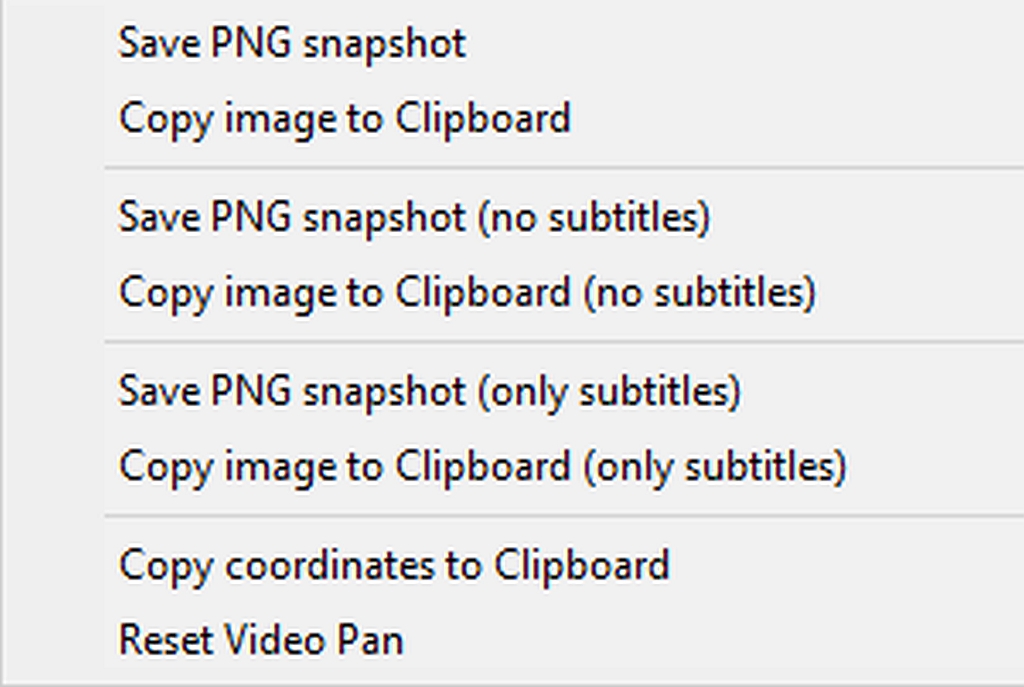
    If you rightclick, the options are perfect for getting ffmpeg information.
    Save PNG snapshot
    Copy image to Clipboard
    Save PNG snapshot (no subtitles)
    Copy image to Clipboard (no subtitles)
    Save PNG snapshot (only subtitles)
    Copy image to Clipboard (only subtitles)
    Copy coordinates to Clipboard
    Reset Video Plan

    The only thing left is to feed that information into the ffmpeg crop.
    ffplay -i in.mp4 -vf "crop=80:60:200:100"
    ffmpeg -i in.mp4 -vf "crop=80:60:200:100" -c:a copy out.mp4
    https://video.stackexchange.com/questions/4563/how-can-i-crop-a-video-with-ffmpeg

    --- SoupGate-Win32 v1.05
    * Origin: fsxNet Usenet Gateway (21:1/5)