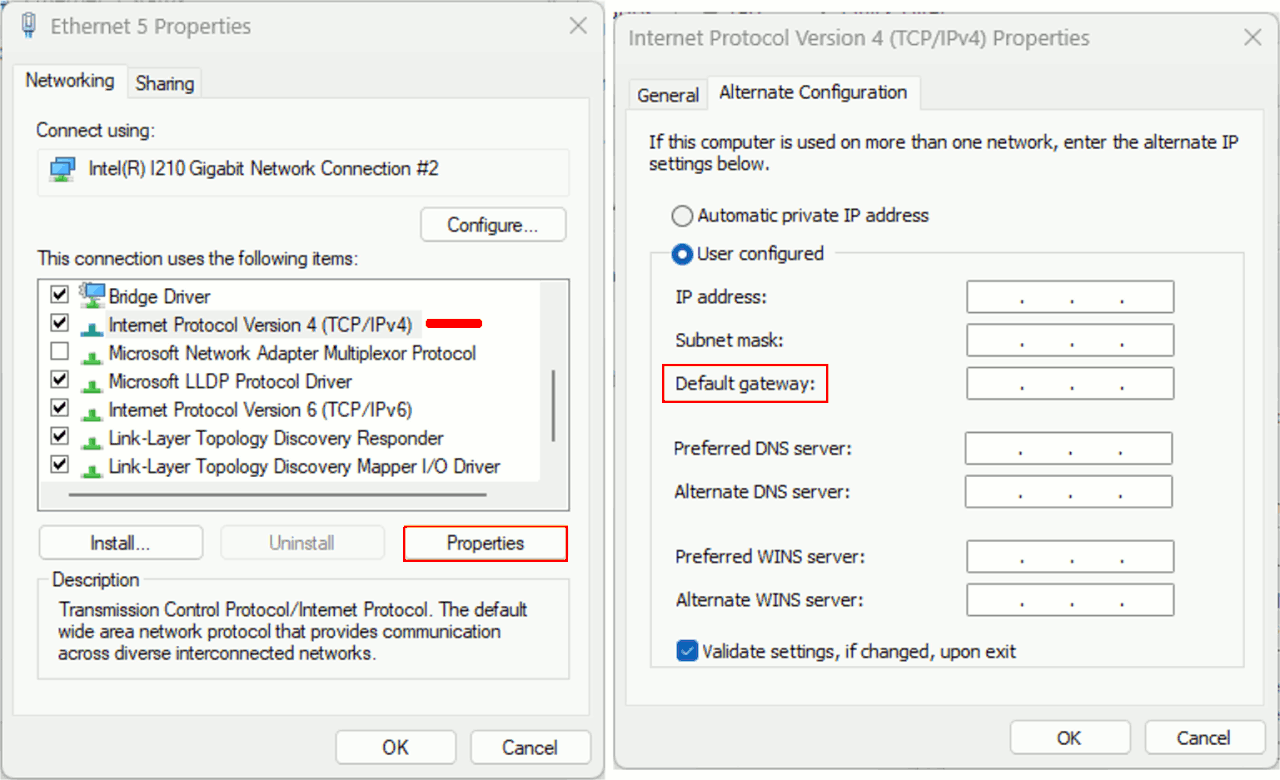
ipconfig
netsh interface ipv4 show config "Ethernet"
netsh interface ipv4 set address name="Ethernet" static 192.168.1.2 255.255.255.0 192.168.1.1
ping 192.168.1.1
Netgear instructions say to either open Firefox to
https://192.168.1.1 (default to port 80) or to just point a Firefox web browser to the URLhttp://www.routerlogin.net/start.htm
Both work.
How?
The ip address works by dhcp, provided by the router.actually dhcp isn't required because you statically configured your
How are they the same when there is no Internet involved & hence no DNS?
When I get a new Netgear router or when I reset my Netgear router to the factory defaults, that sets the router to 192.168.1.1 on port 80 or 8080.
Then I set my Windows PC to the same subnet as that of the router.
I connect an Ethernet cable from my PC to one of the 4 router LAN ports.
This then establishes a connection from the PC to the router over Ethernet.
ipconfig
netsh interface ipv4 show config "Ethernet"
netsh interface ipv4 set address name="Ethernet" static 192.168.1.2 255.255.255.0 192.168.1.1
ping 192.168.1.1
At this point, Netgear instructions say to either open Firefox to https://192.168.1.1 (default to port 80) or to just point a Firefox web browser to the URL http://www.routerlogin.net/start.htm
Both work.
How?
How are they the same when there is no Internet involved & hence no DNS?
How does Firefox on Windows know that routerlogin.net is 192.168.1.1?
When I get a new Netgear router or when I reset my Netgear router to the factory defaults, that sets the router to 192.168.1.1 on port 80 or 8080.
Then I set my Windows PC to the same subnet as that of the router.
I connect an Ethernet cable from my PC to one of the 4 router LAN ports.
This then establishes a connection from the PC to the router over Ethernet.
ipconfig
netsh interface ipv4 show config "Ethernet"
netsh interface ipv4 set address name="Ethernet" static 192.168.1.2 255.255.255.0 192.168.1.1
ping 192.168.1.1
At this point, Netgear instructions say to either open Firefox to https://192.168.1.1 (default to port 80) or to just point a Firefox web browser to the URL http://www.routerlogin.net/start.htm
Both work.
How?
How are they the same when there is no Internet involved & hence no DNS?
How does Firefox on Windows know that routerlogin.net is 192.168.1.1?
...
How are they the same when there is no Internet involved & hence no DNS? How does Firefox on Windows know that routerlogin.net is 192.168.1.1?
Resolving a domain name to an IP normally *does* involve using the
internet - connecting to a DNS server and asking it to translate the
name to its IP.
... Though there is a (good) chance that the router will intercept this particular DNS request ...
IP address 192.168.1.1 is internal.
... Though there is a (good) chance that the router will intercept this particular DNS request and returns its own IP (which, for ease-of-use, makes sense).
If you don't care what IP address your computer(s) get from the DHCP
server, and which could change later, just leave the DHCP server to
assign whatever it wants to your computer(s). If you want static IP >assignments from the DHCP server, use the MAC rule to assign a specific
IP address to your computer(s).
For example, I want my computers in a
different subnet than for those of my family, so I assign IPs to my
computers using a MAC rule. I also don't want them using my
computer(s), so I don't allow traffic across subnets: they have their
subnet, I have mine, and the twain shall not meet.
On Tue, 22 Oct 2024 12:10:19 -0500, VanguardLH <[email protected]> wrote:
For example, I want my computers in a different subnet than for those
of my family, so I assign IPs to my computers using a MAC rule. I
also don't want them using my computer(s), so I don't allow traffic
across subnets: they have their subnet, I have mine, and the twain
shall not meet.
Does your router support multiple subnets, or are you using multiple
routers, or something else? I have multiple subnets on my physical
LAN, but I only do that via stacked static IPs. Those extra subnets
don't have Internet access. Meanwhile, in my VMware virtual
environment, I have well over a hundred subnets and most of them
have, or can have, Internet access via VMware's NAT function.
Just curious to hear how you do it. You already explained the why.
Resolving a domain name to an IP normally *does* involve using
the internet - connecting to a DNS server and asking it to translate
the name to its IP.
You have to know what DNS server to contact, though.
... Though there is a (good) chance that the router will intercept
this particular DNS request ...
There is no "intercept" if the request was directed at the router in the first place.
Lawrence,
Resolving a domain name to an IP normally *does* involve using
the internet - connecting to a DNS server and asking it to translate
the name to its IP.
You have to know what DNS server to contact, though.
The OP said that he could use an URL to connect to his routers configuration page. That means that your "you have to know" isn't part of his problem.
... Though there is a (good) chance that the router will intercept
this particular DNS request ...
There is no "intercept" if the request was directed at the router in the
first place.
*Every* internet connection "is directed at" the router. Most all of it
wil effectivily just pass thru.
But to be pedantic about it, *every* connection, in or out a router, is
being "intercepted". You know how a routers address translation,
firewalling and port-forwarding works, don't you ? Yep, every packet gets inspected, and than either rejected or modified before being send on.
Regards,
Rudy Wieser
Lawrence,
Resolving a domain name to an IP normally *does* involve using
the internet - connecting to a DNS server and asking it to translate
the name to its IP.
You have to know what DNS server to contact, though.
The OP said that he could use an URL to connect to his routers configuration page. That means that your "you have to know" isn't part of his problem.
... Though there is a (good) chance that the router will intercept
this particular DNS request ...
There is no "intercept" if the request was directed at the router in the
first place.
*Every* internet connection "is directed at" the router. Most all of it
wil effectivily just pass thru.
But to be pedantic about it, *every* connection, in or out a router,
is being "intercepted". You know how a routers address translation, firewalling and port-forwarding works, don't you ? Yep, every packet
gets inspected, and than either rejected or modified before being
send on.
Windows automation uses DHCP, but I don't know if Windows knows
immediately how to find the DHCP server. Maybe it's a broadcast protocol,
Char tells me, that if I set the gateway to zero, that will disconnect
me from the Internet.
If I set the gateway to zero, the theory is I can still network
with the other devices in the room. (Operation is switched rather than routed).
BTW, most recent versions of Firefox don't process HTTP(no "S") URLs by default. You need to use private window or safe mode.
Normally, a request for domain goes through my router, into my modem,
and out into the Internet to a domain-name server (DNS) to get an IP
address. I suspect that my router -- and yours -- is hard coded to
intercept and recognize <http://www.routerlogin.net/> as being internal
to itself as IP address 192.168.1.1.
IP address 192.168.1.1 is internal.
All listed here <https://www.rfc-editor.org/rfc/rfc1918.txt>.
<http://192.168.1.250> (this is only mentioned once in the pdf document!)
Is there a way to get Firefox to go to those addresses without the "s"?
Windows automation uses DHCP, but I don't know if Windows knows
immediately how to find the DHCP server. Maybe it's a broadcast protocol,
but I'd have to look that up. The only "address" Windows has, is it
can use the APIPA address if all other configuration attempts fail.
Char tells me, that if I set the gateway to zero, that will disconnect
me from the Internet. I guess that's a kind of hint as to how it works.
If I set the gateway to zero, the theory is I can still network
with the other devices in the room. (Operation is switched rather than routed).
Char Jackson <[email protected]d> wrote:
On Tue, 22 Oct 2024 12:10:19 -0500, VanguardLH <[email protected]> wrote:
For example, I want my computers in a different subnet than for those
of my family, so I assign IPs to my computers using a MAC rule. I
also don't want them using my computer(s), so I don't allow traffic
across subnets: they have their subnet, I have mine, and the twain
shall not meet.
Does your router support multiple subnets, or are you using multiple
routers, or something else? I have multiple subnets on my physical
LAN, but I only do that via stacked static IPs. Those extra subnets
don't have Internet access. Meanwhile, in my VMware virtual
environment, I have well over a hundred subnets and most of them
have, or can have, Internet access via VMware's NAT function.
Just curious to hear how you do it. You already explained the why.
Sorry, I meant port isolation. Some managed switches have an option to >restrict taffic between ports.
You can configure which LAN ports can
connect to each other with all them having access to an uplink. Easier
than having to use a tree of routers (acting as a switch) that restrict >traffic to only the hosts connected to it, and them going to a top
router that only connects ports to the WAN port to pass traffic out to
the Internet.
https://www.tp-link.com/us/support/faq/525/
It can also be called traffic segmentation, as in:
https://support.dlink.com/resource/PRODUCTS/DGS-1100-SERIES/DGS-1100-05_05PD_08_08P_REVB_MANUAL_v2.21_WW_EN.pdf
Security > Traffic Segmentation, page 36.
Some wifi routers can also let you isolate traffic between wifi hosts
and wired hosts.
https://support.denon.com/app/answers/detail/a_id/3746/~/wireless%2C-ap-or-client-isolation
VLAN (aka Private LAN) is another method to isolate hosts. A VLAN has >switched [private] ports that only connect to a single uplink.
A managed switch operates at layer 2 (data link) and a router at layer 3 >(network). Almost all routers for a long time include a switch, but not
with many features for consumer-grade devices.
I haven't looks for a long time, so I don't know if there are routers
with inbuilt managed switches to let you use one device (and include
wifi access with wifi isolation from LAN ports).
In a home setup, you
already have an uplink to the router built into the cable modem.
Instead of a router, use a managed switch before the cable modem. If
you already have a tree of routers, some may be only used as switches,
so those could be replaced with managed switches.
On 10/22/2024 5:37 PM, David E. Ross wrote:
Normally, a request for domain goes through my router, into my modem,
and out into the Internet to a domain-name server (DNS) to get an IP
address. I suspect that my router -- and yours -- is hard coded to
intercept and recognize <http://www.routerlogin.net/> as being internal
to itself as IP address 192.168.1.1.
Thanks for explaining the hard coding is in the router, which, in this case was for the main router which used <http://www.routerlogin.net/>.
When I tried to set up the Netgear mesh extenders, they have a DIFFERENT hard-coded address to use which is <http://www.mywifiext.net>.
I had trouble with the extender recognizing that address and when I looked
it up in the user guide, they said many people have that problem, so to try DIFFERENT hard-coded addresses depending on what OPERATING SYSTEM I was on. <http://mywifiext>
<http://mywifiext.local>
<http://192.168.1.250>
This is crazy if you ask me - and I wouldn't blame you if you didn't
believe me that this is what Netgear says to do - so I produce the document that says what appears to me to be one of the craziest ways to do things.
Here is the Netgear EAX80 landing page with the documentation links. https://www.netgear.com/support/product/eax80/
And here's the user manual for that EAX80 wireless mesh extender. http://www.downloads.netgear.com/files/GDC/EAX80/EAX80_UM_EN.pdf
On page 17, they tell you to use <http://mywifiext.net> but Firefox keeps switching that to https even though I added it into the whitelist but
Firefox still attempts to go to an encyrpted https URL even though I eventually turned off the default settings to only use encrypted URLs.
Troubleshooting further why Firefox can't get to <http://mywifiext.net> on page 18 they tell you not to use the http - but that changes nothing.
Since Firefox can't access "mywifiext.net" I read further and they suggest
if that address doesn't work, then on page 19 they suggest a few more. <www.mywifiext.net>
<http://mywifiext.local>
<http://mywifiext.local/>
<http://mywifiext>
<http://193.168.1.3> (you have to guess at the actual IP address though)
I have two extenders, one of which finally, after a half hour of trial and error, finally connected where I FORGOT which one of the above worked.
But the other extender doesn't recognize ANY of those hard-coded addresses, so that's what prompted the question (which I simplified to the main
router).
On page 20 and again on 22 & again on 24 & 25 & 26 & 27 & 28 & 29 & 30 & 32
& 33 & 34, 35, 36, 37, 39, 42, 43, 44, 45, 46, 47, 49, 51, 52, 53, 54, 55, 61, 62, 63, 64, 67, 68-69...(I'm not kidding!) over and over they repeat these strange addresses in that 78-page document until finally on page 70 there's a section listed for "Cannot Access mywifiext.net".
Since I'm not connecting with Firefox on Windows, I tried the
troubleshooting on page 73 which really just says to keep trying.
Strangely, on page 74 the tell you to use 192.168.1.250 (which also does
not work for me) - but why - all of a sudden - did THAT IP address show up?
They tell me to "log into my router" to find that IP address, but the whole point is that it's NOT CONNECTED to the router yet during setup - so how am
I supposed to do that (I looked at the router's connected devices anyway, like a good boy doing what I'm told - but it's not connected yet so it's
not there).
Then it tells me to "clear your browser cache and try again".
WTF?
I'm still not connected to the extender even though Netgear repeats all the guesses you're supposed to try, which just sounds ridiculous to me that we have to guess the address and to try different addresses on different platforms where my Windows Firefox isn't allowing it to connect. <http://www.mywifiext.net/>
<http://mywifiext/>
<http://mywifiext.local/>
<http://mywifext.local/>
<http://192.168.1.3/> (you're supposed to magically know this address)
Can anyone help me make sense of why Netgear is telling us to basically
guess at the address that is hard coded into their product line?
Windows automation uses DHCP, but I don't know if Windows knows
immediately how to find the DHCP server. Maybe it's a broadcast
protocol ...
Even consumer-grade routers have firewalls.
*Every* internet connection "is directed at" the router.
*Every* internet connection "is directed at" the router.
No. That's the difference between layer 3 (network) and layer 4
(transport) in the protocol stack.
Everybody knows how to use DHCP.
You start by grabbing a temporary address in the nonroutable 169.254/16 range,
then do a subnet-local broadcast (to the 255.255.255.255 address) to find
a DHCP server
Once it replies "here I am", the protocol takes it from there.
On Wed, 23 Oct 2024 07:56:19 -0500, VanguardLH wrote:
Even consumer-grade routers have firewalls.
They may be just packet filters, that block/allow traffic based on source/ destination address and port, nothing more.
On Thu, 24 Oct 2024 04:55:58 -0000 (UTC), Lawrence D'Oliveiro wrote:
On Wed, 23 Oct 2024 06:52:16 -0400, Paul wrote:
Windows automation uses DHCP, but I don't know if Windows knows
immediately how to find the DHCP server. Maybe it's a broadcast
protocol ...
Everybody knows how to use DHCP.
"Everybody knows" ? Really ?
On 24.10.24 00:56, Lawrence D'Oliveiro wrote:
On Wed, 23 Oct 2024 07:56:19 -0500, VanguardLH wrote:
Even consumer-grade routers have firewalls.
They may be just packet filters, that block/allow traffic based on
source/destination address and port, nothing more.
This is exactly the definition of a firewall.
On Thu, 24 Oct 2024 07:37:21 -0400, Jörg Lorenz wrote:
On 24.10.24 00:56, Lawrence D'Oliveiro wrote:
On Wed, 23 Oct 2024 07:56:19 -0500, VanguardLH wrote:
Even consumer-grade routers have firewalls.
They may be just packet filters, that block/allow traffic based on
source/destination address and port, nothing more.
This is exactly the definition of a firewall.
No. Firewalls do smarter things, like monitor for suspicious activity.
On Thu, 24 Oct 2024 07:37:21 -0400, Jörg Lorenz wrote:
On 24.10.24 00:56, Lawrence D'Oliveiro wrote:
On Wed, 23 Oct 2024 07:56:19 -0500, VanguardLH wrote:
Even consumer-grade routers have firewalls.
They may be just packet filters, that block/allow traffic based on
source/destination address and port, nothing more.
This is exactly the definition of a firewall.
No. Firewalls do smarter things, like monitor for suspicious activity.
On 24.10.24 17:08, Lawrence D'Oliveiro wrote:
On Thu, 24 Oct 2024 07:37:21 -0400, Jörg Lorenz wrote:
On 24.10.24 00:56, Lawrence D'Oliveiro wrote:
On Wed, 23 Oct 2024 07:56:19 -0500, VanguardLH wrote:
Even consumer-grade routers have firewalls.
They may be just packet filters, that block/allow traffic based on
source/destination address and port, nothing more.
This is exactly the definition of a firewall.
No. Firewalls do smarter things, like monitor for suspicious activity.
LOL: You mean Norton Security?
On 24.10.24 17:08, Lawrence D'Oliveiro wrote:
No. Firewalls do smarter things, like monitor for suspicious activity.
LOL: You mean [Windows crap]?
Everybody knows how to use DHCP.
"Everybody knows" ? Really ?
Hint: the person I was replying to said "Windows knows". "Windows"
is not a person.
No. Firewalls do smarter things, like monitor for suspicious activity.
LOL: You mean Norton Security?
| Sysop: | Keyop |
|---|---|
| Location: | Huddersfield, West Yorkshire, UK |
| Users: | 764 |
| Nodes: | 16 (2 / 14) |
| Uptime: | 26:20:50 |
| Calls: | 12,756 |
| Calls today: | 4 |
| Files: | 15,359 |
| Messages: | 6,556,784 |