On Wed, 8/28/2024 12:51 PM, Bill Bradshaw wrote:
Paul wrote:
On Tue, 8/27/2024 12:52 PM, Bill Bradshaw wrote:
So far since August 1st according the Activity Monitor the svhost.exe
program has sent (From Microsoft) 994 MB to my computer. 523 MB has
accured since August 20th. Is there some program that will show
which service(s) ares responsible for this activity? I am never
happy when activity is taking place on my computer and I do not know
exactly what it is and what is responsible for it. I have brought
this up before.
Unless the machine never reboots, the PID on the guilty SVCHOST
will change on each reboot.
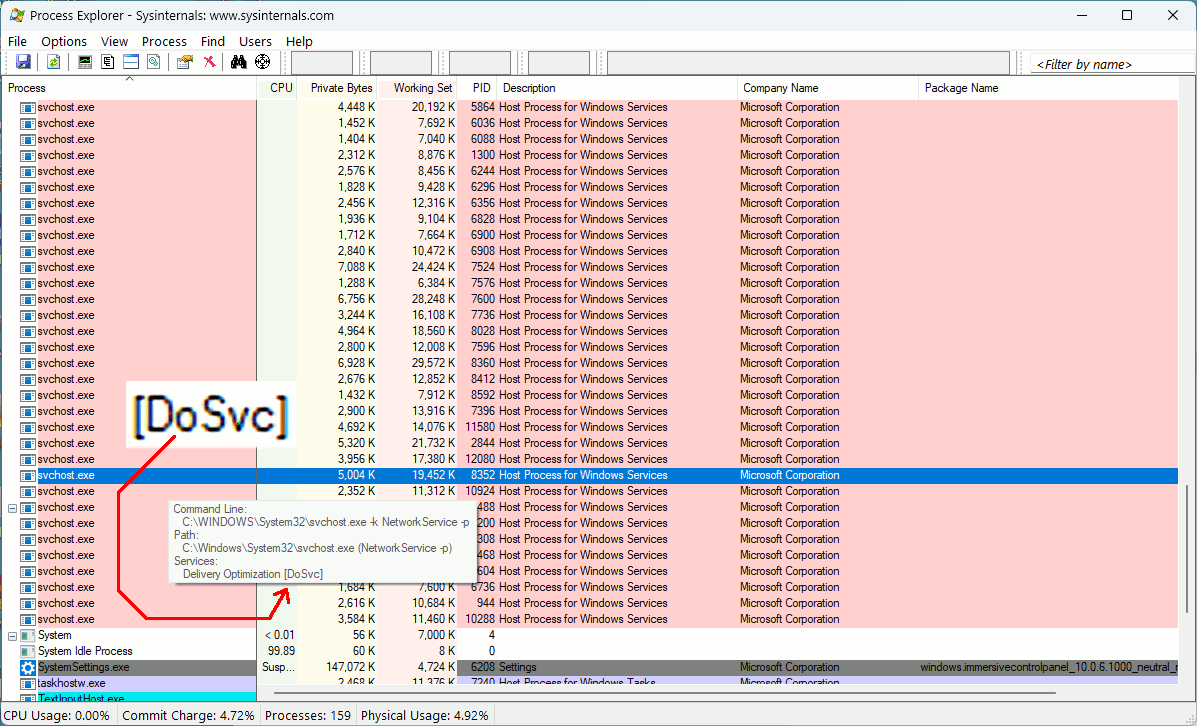
If you know the PID, then
tasklist /svc
will show the identities of the items inside the SVCHOST.
An example would be DoSvc, which is Delivery Optimization Service.
One Windows 10 computer can serve a Cumulative to another Windows 10
computer, in your same computer room. But that would likely not
count as WAN activity, which is presumably what your bandwidth
counter is identifying.
But after-the-fact activity, once you've rebooted, the PID if
recorded would have no value at all in identifying a guilty party.
You could use TCPView, to display realtime activity. Sort
by packets sent or packets received.
https://learn.microsoft.com/en-us/sysinternals/downloads/tcpview
And Process Explorer provides more info than Task Manager, or
at least the info can be convenient.
https://learn.microsoft.com/en-us/sysinternals/downloads/process-explorer
[Picture] Holding the mouse over an entry, shows some launch
information
https://i.postimg.cc/xCQg8n15/Process-Explorer-SVCHOST.gif
Sysinternals Process Monitor may have been recording network events
too, at one time, but the last time I used it, I got no network
events in the trace (finger problem?). The ETW stream for that, may
have been what Microsoft was using for their own copy of "Wireshark"
(Microsoft Version).
The difference between Wireshark (no process info) and Process Monitor
(process info), is the process info. You could associate an executable
with a packet, which is normally pretty hard to do. I would provide
a link, if I thought it would not be a waste of your time. But it's
another tool, if and when it works. A downside in modern times, is the
use of CDNs like "Akamai" to disguise who you are and what you're
doing.
The trace I took, where packet capture worked, virtually all the
external addresses were Akamai (not Microsoft as they should have
been).
Paul
I have the programs Process Monitor and Wireshark.
On August 24th Microsoft updated Microsoft Edge.
On August 27th Microsoft updated Microsoft Edge Webview2 Runtime.
I am pretty sure that all of the downloads are somehow associated with the Microsoft Edge Cache Server.
I use Firefox and not Edge so I want to stop these downloads for Edge. I have tried stopping the Edge services but that does not seem to help.
There is a lot of pids associated with svchost.exe
<Bill>
MSEdge, Chrome, and Firefox have Service Workers.
Something could have installed a Service Worker.
Perhaps RSS feeds are done that way ?
At least one of the browsers, you can turn Service Workers off.
A Cache Server, as such, starts with a folder full of files,
and other processes could ask for an item, it if is not
in the cache, the request percolates out onto the Internet
to be resolved, then the file is placed into the folder.
Once the folder size limit is reached, the LRU item is
removed. In that way, the folder won't have more
stuff in it, than you specified.
On a single process browser like Seamonkey, the cache
operation is part of the main process.
On Firefox, the cache can be put into RAM, which means
when Firefox is exited, the cache contents are dropped.
One benefit of RAM cache, is less writes to SSD.
If you take MSEdge out of your startup items, maybe
it won't be sitting around later. But, just about
anything can wake it up. CoPilot usage will re-start MSEdge.
The MSedge updaters on the other hand, could be launched
from Scheduled Tasks. Perhaps clicking a Help button
would trigger a re-start of MSEdge you had killed.
*******
In the picture here, I can see my browser Seamonkey sending a packet
and receiving a reply. The node is an ISP called EDGECAST, and
the actual company doing the service is unknown. My local nslookup
cannot resolve the address, so I didn't even get that far. This is
why the item is numeric instead of symbolic (www.cnn.com). The
main value of the event captured, is I see a process Seamonkey,
and, I have a PID value to work with. For example "tasklist /svc"
can help me map a PID to a SVCHOST identification.
[Picture] Process Monitor has network capability now
https://i.postimg.cc/mk59BJRS/process-monitor-network-event.gif
Paul
--- SoupGate-Win32 v1.05
* Origin: fsxNet Usenet Gateway (21:1/5)