On 7/4/2024 7:28 AM, Ed Cryer wrote:
Paul wrote:
On 7/3/2024 3:32 PM, Ed Cryer wrote:
Paul wrote:
On 7/3/2024 11:14 AM, Ed Cryer wrote:
I have a pair of Sonos speakers. The Sonos app under Win10 runs them, but I'd like to have them available under Windows itself.
They appear in my router with an IP address, but nowhere under Win10 sound settings.
Can it be done?
Ed
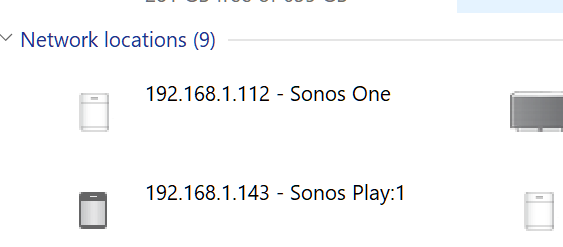
There is a claim here, they can be seen in Explorer, below My PC.
https://en.community.sonos.com/speakers-228992/how-to-identify-sonos-speaker-s-ip-address-6837426
https://uploads-eu-west-1.insided.com/sonos-en/attachment/73b0ec2d-63d1-4fd0-8097-46dd498908b0.png
Would these have "Properties" ? Check and see.
Still don't see a simple explanation of whether they push or pull,
and how it works. This thread claims they have a web interface on
Port 1400.
https://bsteiner.info/articles/hidden-sonos-interface
http://<sonos_ip>:1400/status
Paul
Sonos have planted a whole mess on my PC and lots of others.
They recently removed SMB in an update, but without prior warning.
All of a sudden we didn't have access to our NAS.
And when we all looked around the shop, there are various entries in our routers, a recommendation to alter Windows shares (which doesn't work), and a complete indifference from Sonos.
I uninstalled the app, re-installed, and same problem.
It's yet another example of the rising occurrence of couldn't-care-less programming; we're the bosses, we do it, get lost.
I call it Trumpism.
Oh, and so I went in search of an earlier version of the app (prior to 8.0) and couldn't find one).
Ed
Not all the entries in this blurb will be appropriate. This just
hints at the complexity of the control and data ports the thing uses,
similar to the complexity of VOIP setup and teardown. Apparently UPNP
figures prominently. The only thing I know about that, is I could
see on a streaming server I set up, what tracks and albums were on
offer. I don't know if there are other UPNP setups or not or what
they might be.
https://community.ui.com/questions/Need-help-SONOS-with-VLANs-not-working/e006dde3-c4ad-4b03-98ed-b61f7b2b817b
Here are the Groups:
Sonos Control (Ports): 1400 and 4444
Sonos Players (IP): 10.20.0.6-10.20.0.9 (fixed IPs)
Sonos TCP (Ports): 445, 3401, 3445, 3500, 4070, 4444, 1400, 1443, 7000, 8080, 5000, 5001, 32000-49999
Sonos UDP (Ports): 136-139, 1900, 1901, 2869, 10243, 10280-10284, 5353, 6969, 3722, 319, 320
mDNS (IP):224.0.0.251
Secure LANS: 10.0.0.0/24, 10.10.0.0/24
I guess people buy this stuff for the "puzzles" it presents ? :-)
https://bsteiner.info/articles/hidden-sonos-interface
I guess this is where you get out your copy of Wireshark, while
it is working, and you reverse engineer the thing. That's most
practical if it uses http and not https. And given the devices
hold account and password information for music sources, the chances
of http are slim to none.
Paul
Blimey! I'm not entering that pool of sharks!
Why have Sonos done this? A month now, and they've issued no update.
I think I'll try a wired connection until they sort it out.
Will this work into two speakers?
A splitter in the back of the PC; two 3.5 cables into speakers. I can get 3 metre long cables.
Ed
Traditional splitters, were 1/8" stereo plug (tip,ring,sleeve) to two RCA/Cinch connectors.
Then you could use similar stereo plugs on the other end, and only connect up one
RCA on each of them.
It's really a function of what is in your junk drawer. And the gender of the items.
For example, if you have male and female solder-tail plugs and jacks a-plenty, then some rolls of coloured wire, your trusty soldering iron, and you can do a neat and tidy twisted pair line level splitter without all the nonsense in the diagram.
The diagram is intended for someone who mostly does not solder, but happens
to have Cinch Junk about the place, ready to go. If you play with AV receivers enough, you usually acquire the adapters in the diagram.
________________
L / \ L
/ \ 1/8" to dual Cinch ---- Spkr Left
Tip,Ring,Sleeve = L,R,Ground ---- 1/8" to dual Cinch /
\ x
R \_________________
\ L
\ 1/8" to dual Cinch ---- Spkr Right
/
x
The assumption is that the speaker input, the Mono signal it wants is on L.
A mono jack would have L shorted to R, so you should be careful to not
allow it to actually short L to R when you did not want that to happen.
That's why you're only hooking up the one signal on the right hand side of the diagram.
If we wired everything in strict parallel, it would be wrong... and a nightmare.
Our wiring pattern then, is "safety first". No allowing the speaker to short L to R.
I'm leaving R open circuit in the diagram.
You won't get a hum loop, unless the Sonos has done something
nasty with safety ground. The Sonos should only use two wires
for power, a Hot and a Neutral. Safety Ground should not be
connected, and the speaker cabinet should be plastic and
providing the desired "double insulation". I'm assuming the
Sonos has a Linux computer inside it, and at the least, has
mains to +5V just to run the computer. A higher potential
would power the speaker drive transistors.
Paul
--- SoupGate-Win32 v1.05
* Origin: fsxNet Usenet Gateway (21:1/5)