Alan Holbrook <
[email protected]> wrote:
My installation of Edge used to (stress: used to) have a bar of icons
across the top of the home screen pointing to various often used web
pages. I'm not talking about the 'favorites' bar. These were
shortcuts to often used web sites. After the last push update, this
bar disappeared and I can't figure out how to restore it. Can
someone please help?
What are your home tab and new tab settings?
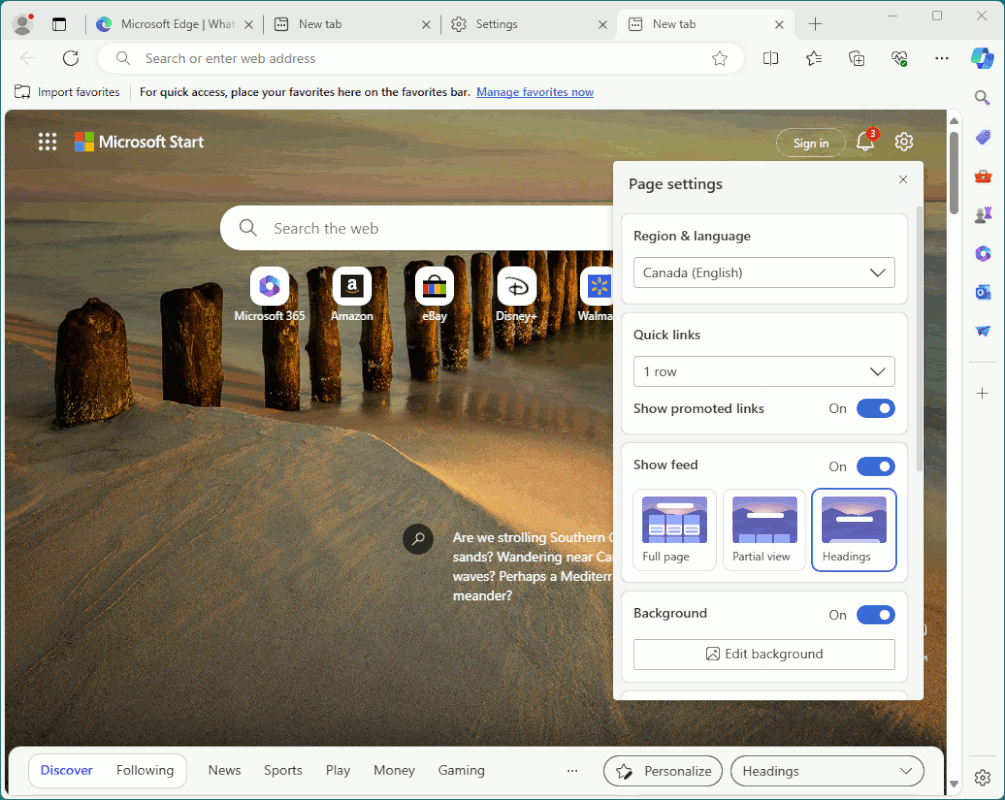
When you open a new tab, do you see "Microsoft", the Bing search box,
and a gear icon (tab settings) at the top right of the document window?
You won't see this if you have an add-on controlling the new-tab page.
In tab settings, under Quick Links, is it Off, or 1 or 2 rows? You need
to show rows to see the quick links. Another way to get to the tab
config screen is shown below:
https://global.discourse-cdn.com/sitepoint/optimized/3X/b/7/b75ec03d1070356bdc398d6d64f5ae06d0ae9404_2_1033x661.png
Again, if you have an add-on controlling home and/or new tabs, this
config settings may not be available to you. Instead you'll see
something like "<addonName> is controlling tabs". I don't like the
new-tab page in Edge. I want a blank tab as the home page when I load
Edge or when I open a new tab, not with a bunch of shit polluting the
new tab, like a search box, shortcuts, settings, etc. However, if I
configure Edge to use about:blank as the home and new tab pages, it
populates the address bar with "about:blank" that I have to erase before
I can start entering the URL where I really intended to visit (except
now clicking in the address bar will select its entire contents, so I
just have to hit Back to erase about:blank, but it is an extra step).
So, instead I use the Blank Tab add-on to manage new-tab pages (
https://microsoftedge.microsoft.com/addons/detail/blank-tab/ihknoknoahjhldmpdoajjdkfjhddgpcd)
which also means the Edge settings get disabled a mention of the "Blank
Tab is controlling the new tab page", which is just what I want. The
Blank Tab add-on gives me a blank new-tab page, and without polluting
the address bar with about:blank, and whatever was configure in Edge for
its internal new-tab page is not used. However, you want Edge's new-tab
page, so make sure an add-on is not interferring.
If you don't know which add-on is putzing with the new-tab page (should
be indicated when you attempt to change config in settings), disable all add-ons, exit Edge, and retest.
I'm not sure what you mean by a "bar" across the new-tab page. These
weren't shortcuts under the Bing search box, but instead actually at the
top of the document window? Might those shortcuts have been in a
toolbar, and not in the document window at all? Perhaps what you are
now missing is the Favorites toolbar.
edge://settings/appearance
Enable the "Show favorites bar" setting.
Since I configured Edge to show a Favorites button in its toolbar (to
the right of the address bar), I didn't see the need to duplicate that
function with a toolbar that always wastes screen realestate, but some
users always want to see their Favorites even when not using them.
If what you are asking is not part of the Edge's new-tab page, or its
Favorites toolbar, take a screenshot of Edge's window, upload to online
storage (i.e., imgur), and give the URL to your screenshot, so we can
see what you're trying to describe. Be sure to blur out using an image
editor anything personal you don't want everyone to see in your
screenshot of your Edge instance.
--- SoupGate-Win32 v1.05
* Origin: fsxNet Usenet Gateway (21:1/5)