On 9/29/2021 5:51 PM,
[email protected] wrote:
Several drives have been established which are not now needed and have
no data, but apparently can't be deleted. When right clicked in the
Explorer, there is no option to shred available. Hpw can I delete
these useless drives ? !
Be careful with these urges to destroy things, OK ?
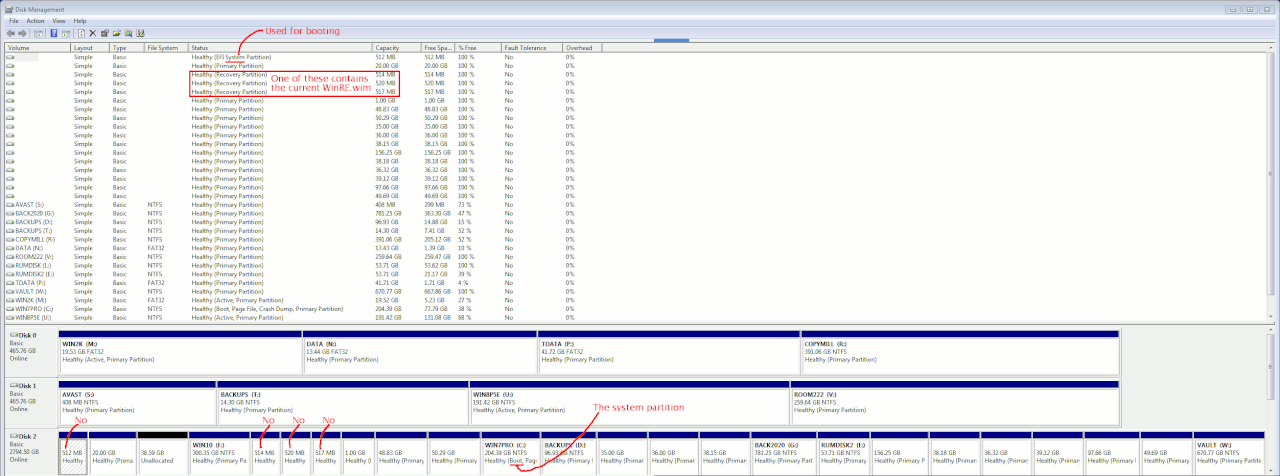
If the "useless drives" were around 500MB to 1GB in size,
some of those are partition 0x27 (Hidden NTFS) and those
may contain things like the WinRE.wim for reagentc.
There's not even a notation in Disk Management for that one,
no warning about deleting those.
If the partitions in question were "created by you", then
those are safer to delete.
You're picked the *dangerous* ones to delete :-)
Windows Disk Management (diskmgmt.msc) has notations "boot" and
"system". On a GPT disk the word "system" appears in "EFI system partition" label. That's a small partition, normally towards the front of
the disk drive. The C: partition has the word "boot" in it, and
Microsoft uses reverse-think on these, as "boot" means
"this is the system partition". Boot and system are the exact
opposite of their function.
"system label" equals the thing starting the boot process
"boot label" equals the C: partition aka the system as we know it
https://i.postimg.cc/YSPxYrXn/smaller-partitions-dont-delete.gif
Paul
--- SoupGate-Win32 v1.05
* Origin: fsxNet Usenet Gateway (21:1/5)