tb wrote:
I have a Microsoft Surface 2 laptop with Windows 10 Pro (64-bit)
installed.
Every time that I insert my USB external hard drive (WD EasyStore), the computer freezes for approx. 1-2 minutes. It does the same thing every
time that I use a program that needs to acces the USB drive.
For instance, when I plug in the WD drive, I have to wait 1-2 minutes
before I can access it with File Explorer. If I then launch a backup
program to copy files from my c:\ drive to the USB drive, I have to
wait 1-2 minutes before I can press the icon that starts the backup.
This does not happen with any other computer that I use. (None of them
are Microsoft Surface!)
What could be the reason that causes the Microsoft surface 2 to freeze?
WD EasyStore seems to be a 3.5" technology, complete
with power adapter.
https://shop.westerndigital.com/products/portable-drives/wd-easystore-desktop-usb-3-0-hdd#WDBAMA0080HBK-NESN
This makes it unlikely the drive is disconnecting because
the USB3 "fuse" opened. It should be drawing a modest
amount of current, well well below the 900mA limit.
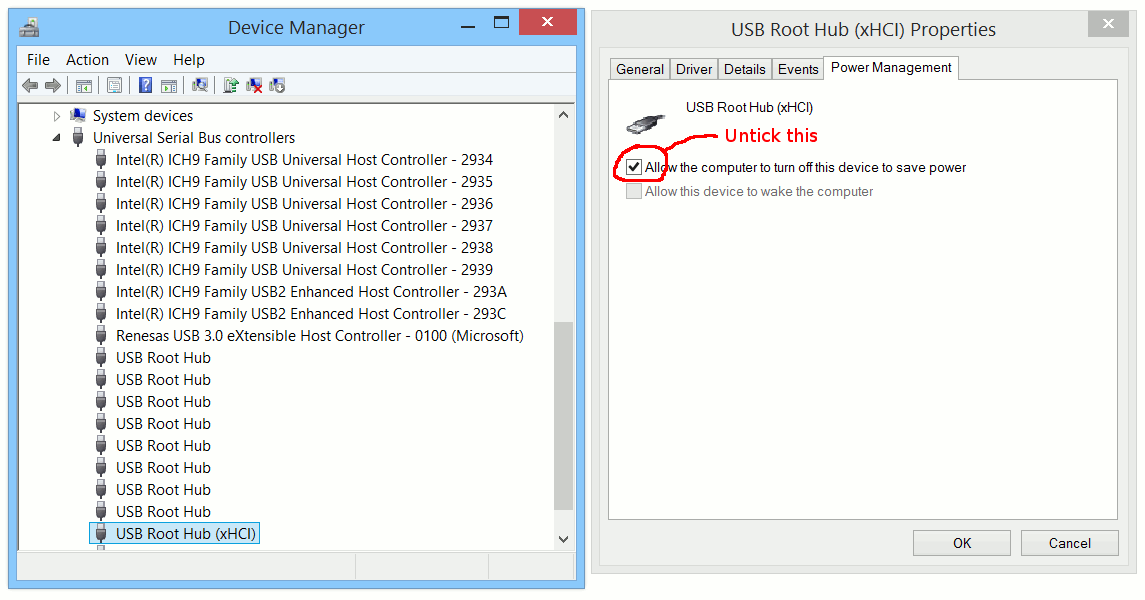
You can try adjusting the power saving behavior of your
USB3 thing.
https://i.postimg.cc/zBW2p87y/disable-usb-power-save.gif
At least some of the Surface product line, implements
S0ic, which is an alternative to S0,S1,S2,S3 in normal
ACPI. This is an alteration in the power state model for
computers. It allows the computer to be perfectly responsive,
yet only draw "sleep-like" levels of power. Other companies
at the time (Dell and HP), did not feel this tech was
"ripe-enougn" to use. So Surface ended up being the test
platform.
I think I would have a hard time, debugging this myself if
the Surface was in front of me. A USB power meter might
give a tiny bit of assurance about what state the port is in.
(Drawing exactly zero milliamps, that would be bad.) I'd be
more in favor of theories like "a problem with the NTFS
on the partition" or "the AV is doing something", but these
don't sound like good possibilities either. Repeated attempts
to reach the device, should make it "ding like crazy", and you
don't report that as a symptom.
None of my theories is looking all that good at the moment.
The S0ic is a long shot, and to boot, I have no idea how
you even guess at what the equipment is doing. Using powercfg
and doing an energy report, with the disk connected, maybe it
says something there of note. Start the energy report running,
then plug in the drive, set the duration long enough that
the drive is detected. Perhaps the worked example here had
the current working directory set to C:\ and that's why the
HTML report ended up in the root of the drive, under C:\ .
https://www.windowscentral.com/how-create-energy-report-windows-10
Paul
--- SoupGate-Win32 v1.05
* Origin: fsxNet Usenet Gateway (21:1/5)