• How to create a relative shortcut ?

    From R.Wieser@21:1/5 to All on Tue Sep 2 11:36:46 2025
    XPost: comp.os.ms-windows.programmer.win32, alt.windows7.general

    Hello all,

    I'm trying to create relative shortcuts* (for use on a removable USB
    harddisk) and can't seem to find out how it works.

    * the target of the link is relative to the location of the link itself.

    I'm programming against the IShellLink interface ( https://learn.microsoft.com/en-us/windows/win32/api/shobjidl_core/nn-shobjidl_core-ishelllinka) ,
    which suggests a relative path is possible (SetRelativePath), but I'm not
    able to get it to work or find code explaining how to do it.

    I did find this : https://devblogs.microsoft.com/oldnewthing/20171019-00/?p=97247 , but I'm
    not even sure if that is what I'm after ... :-|

    Question: does someone have an example to what I'm supposed to do to make it happen ?

    Regards,
    Rudy Wieser

    --- SoupGate-Win32 v1.05
    * Origin: fsxNet Usenet Gateway (21:1/5)
  • From Schugo@21:1/5 to R.Wieser on Tue Sep 2 17:50:51 2025
    XPost: comp.os.ms-windows.programmer.win32, alt.windows7.general

    On 02.09.2025 11:36, R.Wieser wrote:
    Hello all,

    I'm trying to create relative shortcuts* (for use on a removable USB harddisk) and can't seem to find out how it works.

    * the target of the link is relative to the location of the link itself.

    I'm programming against the IShellLink interface ( https://learn.microsoft.com/en-us/windows/win32/api/shobjidl_core/nn-shobjidl_core-ishelllinka) ,
    which suggests a relative path is possible (SetRelativePath), but I'm not able to get it to work or find code explaining how to do it.

    I did find this : https://devblogs.microsoft.com/oldnewthing/20171019-00/?p=97247 , but I'm
    not even sure if that is what I'm after ... :-|

    Question: does someone have an example to what I'm supposed to do to make it happen ?

    or 2nd idea: a little app launcher .exe with only a listbox
    with a list of apps and a start button, then ShellEx with
    relative path.

    ciao...

    --- SoupGate-Win32 v1.05
    * Origin: fsxNet Usenet Gateway (21:1/5)
  • From Schugo@21:1/5 to R.Wieser on Tue Sep 2 17:41:49 2025
    XPost: comp.os.ms-windows.programmer.win32, alt.windows7.general

    On 02.09.2025 11:36, R.Wieser wrote:
    Hello all,

    I'm trying to create relative shortcuts* (for use on a removable USB harddisk) and can't seem to find out how it works.

    * the target of the link is relative to the location of the link itself.

    I'm programming against the IShellLink interface ( https://learn.microsoft.com/en-us/windows/win32/api/shobjidl_core/nn-shobjidl_core-ishelllinka) ,
    which suggests a relative path is possible (SetRelativePath), but I'm not able to get it to work or find code explaining how to do it.

    I did find this : https://devblogs.microsoft.com/oldnewthing/20171019-00/?p=97247 , but I'm
    not even sure if that is what I'm after ... :-|

    Question: does someone have an example to what I'm supposed to do to make it happen ?

    Not really, but as a workaround:
    use a .bat instead:

    cd \myPath\
    start myapp.exe
    exit

    ciao...

    --- SoupGate-Win32 v1.05
    * Origin: fsxNet Usenet Gateway (21:1/5)
  • From R.Wieser@21:1/5 to All on Tue Sep 2 18:39:17 2025
    XPost: comp.os.ms-windows.programmer.win32, alt.windows7.general

    Hello Shugo,

    Not really, but as a workaround:
    use a .bat instead:
    [snip]

    or 2nd idea: a little app launcher .exe with only a listbox
    with a list of apps and a start button, then ShellEx with
    relative path.

    I've been thinking of and coming up with a few solutions myself too, but
    would like to explore the possiblility of using an already existing
    mechanism first.

    Thanks for the suggestions though.

    Regards,
    Rudy Wieser

    --- SoupGate-Win32 v1.05
    * Origin: fsxNet Usenet Gateway (21:1/5)
  • From J. P. Gilliver@21:1/5 to R.Wieser on Wed Sep 3 00:34:25 2025
    XPost: comp.os.ms-windows.programmer.win32, alt.windows7.general

    On 2025/9/2 10:36:46, R.Wieser wrote:
    Hello all,

    I'm trying to create relative shortcuts* (for use on a removable USB harddisk) and can't seem to find out how it works.

    * the target of the link is relative to the location of the link itself.


    []

    I'm puzzled; don't . and .. work in shortcuts?

    --
    J. P. Gilliver. UMRA: 1960/<1985 MB++G()AL-IS-Ch++(p)Ar@T+H+Sh0!:`)DNAf

    interracial marriage was still illegal in 17 states in 1967.

    --- SoupGate-Win32 v1.05
    * Origin: fsxNet Usenet Gateway (21:1/5)
  • From R.Wieser@21:1/5 to All on Wed Sep 3 08:15:01 2025
    XPost: comp.os.ms-windows.programmer.win32, alt.windows7.general

    J.P. ,

    I'm puzzled; don't . and .. work in shortcuts?

    Alas no. Not thru the "properties" of an existing one, not when creating
    one using VBScript, and not when doing the same using the IShellLink object.

    The first and the last will throw an error, and VBScript will just silently combine it with the "c:\" root.

    Though for the IShellLink object its possible that I've just not found the correct way to do it...

    That is, using XPsp3. I've got no idea if it has changed on later versions
    of Windows.

    Regards,
    Rudy Wieser

    --- SoupGate-Win32 v1.05
    * Origin: fsxNet Usenet Gateway (21:1/5)
  • From Paul@21:1/5 to J. P. Gilliver on Wed Sep 3 02:21:58 2025
    XPost: comp.os.ms-windows.programmer.win32, alt.windows7.general

    On Tue, 9/2/2025 7:34 PM, J. P. Gilliver wrote:
    On 2025/9/2 10:36:46, R.Wieser wrote:
    Hello all,

    I'm trying to create relative shortcuts* (for use on a removable USB
    harddisk) and can't seem to find out how it works.

    * the target of the link is relative to the location of the link itself.


    []

    I'm puzzled; don't . and .. work in shortcuts?


    A shortcut is designed to be copied or moved anywhere.

    If the shortcut icon is sitting on the desktop, and
    it says ..\programname.exe , that's not going to work.

    If the shortcut icon uses an absolute path, then it can be copied
    or moved anywhere. If the Original file is moved (somewhere), you
    are required to create a new Shortcut (new absolute path).

    If you want a file to appear in two places (on the same partition),
    then mklink or junction.exe might work. Then, the item is no longer
    a shortcut, it's a file, and it looks like a file icon. A hardlink
    of a file can be moved to the desktop, but when the program
    "works out where it is", as some programs do, it is going to find
    that it is not located in the portable folder where all the
    DLLs are located.

    Right now, the betting money is on a shortcut with an absolute
    path inside it. Then, the executable that is loaded, is loaded
    from the same folders as where the DLLs are located (right next
    to the EXE).

    *******

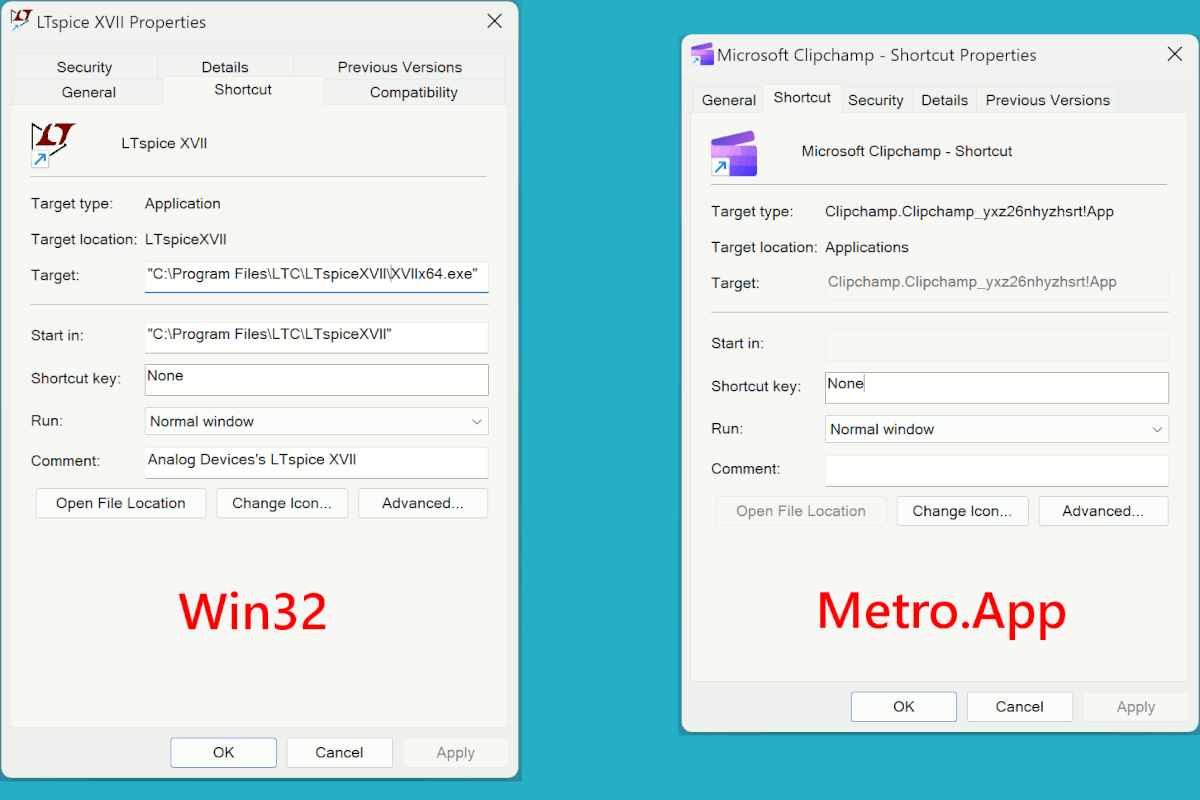
    The rules are different for Metro.App , but the newsgroup
    list does not hint that this is a requirement.

    # A folder full of scum and villainy (mixed types are present)

    explorer.exe shell:AppsFolder

    # These are two shortcuts, compared.
    # I might even find both of these in AppsFolder (on a newer OS).

    [Picture]

    https://i.postimg.cc/ZR6KdXfH/shortcut-comparison.gif

    Paul

    --- SoupGate-Win32 v1.05
    * Origin: fsxNet Usenet Gateway (21:1/5)
  • From R.Wieser@21:1/5 to All on Wed Sep 3 09:47:35 2025
    XPost: comp.os.ms-windows.programmer.win32, alt.windows7.general

    Paul,

    A shortcut is designed to be copied or moved anywhere.

    And, as it looks now, their *only* goal. I can imagine using a full path
    as the default, but ignoring relative paths is just a "it works for us" short-sighteness.

    ... unless you have a good reason why relative paths would not be possible ?

    If the Original file is moved (somewhere), you are required to create
    a new Shortcut (new absolute path).

    Nope. It will try to find the target itself, but gives you the option to browse for it.

    I could easily do without that behaviour (its search method is opaque) and
    just get an "target has gone" error. Have not seen any configuration for
    that though.

    If you want a file to appear in two places (on the same partition),
    then mklink or junction.exe might work.

    Hard links do not work on FAT32 (thumb)drives. And neither program exists
    on my OS (XPsp3).

    but when the program "works out where it is", as some programs
    do, it is going to find that it is not located in the portable
    folder where all the DLLs are located.

    :-) Pros and cons. They have to be weighted.

    Right now, the betting money is on a shortcut with an absolute
    path inside it.

    Not usable on a removable (thumb)drive I'm afraid.

    ... hence my (subject-line) question.

    Regards,
    Rudy Wieser

    --- SoupGate-Win32 v1.05
    * Origin: fsxNet Usenet Gateway (21:1/5)
  • From J. P. Gilliver@21:1/5 to Paul on Wed Sep 3 09:02:35 2025
    XPost: comp.os.ms-windows.programmer.win32, alt.windows7.general

    On 2025/9/3 7:21:58, Paul wrote:
    On Tue, 9/2/2025 7:34 PM, J. P. Gilliver wrote:
    On 2025/9/2 10:36:46, R.Wieser wrote:
    Hello all,

    I'm trying to create relative shortcuts* (for use on a removable USB
    harddisk) and can't seem to find out how it works.

    * the target of the link is relative to the location of the link itself.


    []

    I'm puzzled; don't . and .. work in shortcuts?


    A shortcut is designed to be copied or moved anywhere.

    If the shortcut icon is sitting on the desktop, and
    it says ..\programname.exe , that's not going to work.

    I wouldn't expect it to - unless the target was moved/copied to the same relative location. But that's what R.Wieser said he _wanted_: a shortcut
    the refers to a target relative to where the shortcut is.

    But I don't know - if the "Start in" field is not filled in, does the
    shortcut [or, perhaps more accurately, whatever's processing it] assume
    it is in some prefefined location, such as %windows%\system32 or
    something like that, rather than where the shortcut actually is?>
    If the shortcut icon uses an absolute path, then it can be copied

    Yes, but that's not "relative".

    or moved anywhere. If the Original file is moved (somewhere), you
    are required to create a new Shortcut (new absolute path).

    R didn't say _why_ he wanted "relative shortcuts": all I could think of
    was that he wanted to be able to move/copy an entire structure -
    shortcuts and targets - to a different location (say, another machine,
    or a memory stick or external drive which might have a different letter
    at times).>
    If you want a file to appear in two places (on the same partition),
    then mklink or junction.exe might work. Then, the item is no longer

    I've never got into those (-:

    a shortcut, it's a file, and it looks like a file icon. A hardlink
    of a file can be moved to the desktop, but when the program
    "works out where it is", as some programs do, it is going to find
    that it is not located in the portable folder where all the
    DLLs are located.

    Right now, the betting money is on a shortcut with an absolute
    path inside it. Then, the executable that is loaded, is loaded
    from the same folders as where the DLLs are located (right next
    to the EXE).

    *******

    The rules are different for Metro.App , but the newsgroup
    list does not hint that this is a requirement.

    # A folder full of scum and villainy (mixed types are present)

    explorer.exe shell:AppsFolder

    # These are two shortcuts, compared.
    # I might even find both of these in AppsFolder (on a newer OS).

    [Picture]

    https://i.postimg.cc/ZR6KdXfH/shortcut-comparison.gif

    Paul
    So far, I've (AFAIK) managed to not get involved with metro "app.s";
    from your picture, I see they _have_ Target and Start in parameters, but
    not in editable fields.

    --
    J. P. Gilliver. UMRA: 1960/<1985 MB++G()AL-IS-Ch++(p)Ar@T+H+Sh0!:`)DNAf

    "The wish of the lazy to allow unsupervised access [to the internet] to
    their children should not reduce all adults browsing to the level of suitability for a five-year-old."
    Yaman Akdeniz, quoted in Inter//face (The Times, 1999-2-10): p12

    --- SoupGate-Win32 v1.05
    * Origin: fsxNet Usenet Gateway (21:1/5)