• GT730 videocard freezes. What to do ?

    From R.Wieser@21:1/5 to All on Tue Feb 18 11:37:52 2025
    XPost: alt.windows7.general

    Hello all,

    I've got a 'puter with a GT730 videocard in it, and, when displaying 3D
    stuff (games but simple OpenGL stuff) it regulary locks up, resulting in a "blue screen of death".

    I've not changed the cards default settings, other than adjusting the
    display dimensions.

    According to the NVIDIA control panel I have the driver version 368.81,
    which is the last one I can find. I did find quite a few posts about the
    same problem, but no definitive solution.

    the "Blue screen of death" data :

    NV4_disp.dll

    - Technical information
    stop: 0x0000008E (0xC0000005 0xBD03D22A 0xB29FA548 0x00000000)

    Adr:BD03D22A Base:BD012000


    Does anyone have an idea how to tackle this ?

    Regards,
    Rudy Wieser

    --- SoupGate-Win32 v1.05
    * Origin: fsxNet Usenet Gateway (21:1/5)
  • From Paul@21:1/5 to R.Wieser on Tue Feb 18 11:30:11 2025
    XPost: alt.windows7.general

    On Tue, 2/18/2025 5:37 AM, R.Wieser wrote:
    Hello all,

    I've got a 'puter with a GT730 videocard in it, and, when displaying 3D
    stuff (games but simple OpenGL stuff) it regulary locks up, resulting in a "blue screen of death".

    I've not changed the cards default settings, other than adjusting the
    display dimensions.

    According to the NVIDIA control panel I have the driver version 368.81,
    which is the last one I can find. I did find quite a few posts about the same problem, but no definitive solution.

    the "Blue screen of death" data :

    NV4_disp.dll

    - Technical information
    stop: 0x0000008E (0xC0000005 0xBD03D22A 0xB29FA548 0x00000000)

    Adr:BD03D22A Base:BD012000


    Does anyone have an idea how to tackle this ?

    Regards,
    Rudy Wieser

    Is this a passively cooled card ?

    If so, point a fan at the heatsink.

    You should also have some means of reading out the GPU
    temperature while your OpenGL code is running.

    As I recollect, one of the lower end cards could be delivered
    as a passive, and that one is likely to have a sink and fan because
    of the higher power.

    *******

    There's no point taking it all apart, without
    a temperature measurement showing the temperature is
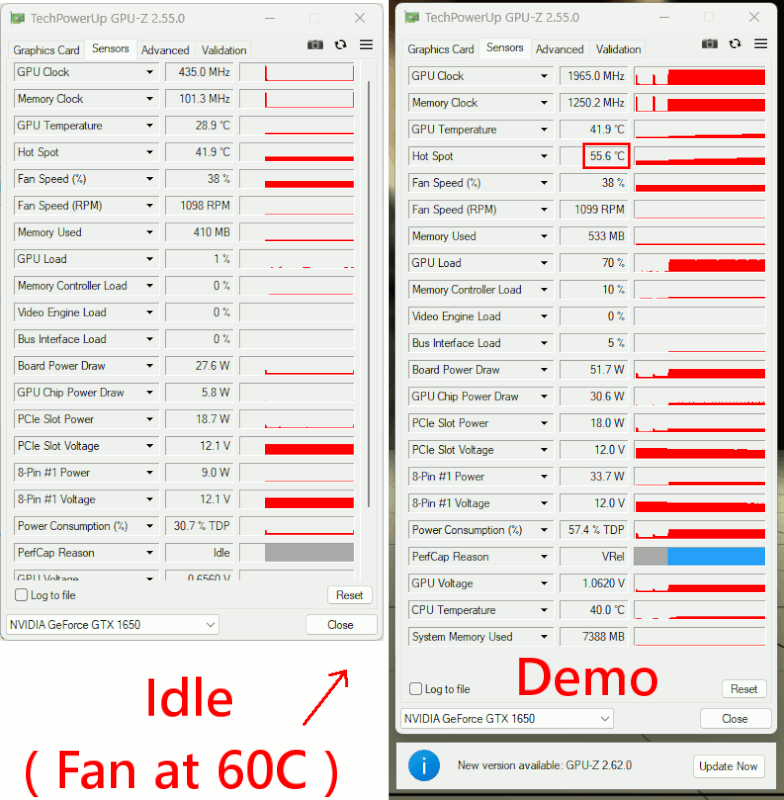
    too hot. Try GPU-Z from techpowerup -- the dev uses
    techpowerup as his dropsite.

    [Picture]

    https://i.postimg.cc/2jPWS5pY/GPU-Z-readout.gif

    If I'd used Furmark, then that gets the sensor hot enough
    to speed up the fan. I was using SmokeParticle.exe, which is
    only a half-load. I've probably got a Furmark on some
    other partition, doesn't seem to be one here.

    On one video card, I've had it apart to put fresh paste
    on it. If there are four screw holes, you use two of
    the (diagonal) screw holes as "sights" to check alignment,
    when laying the card on top of the heatsink. Just about
    all heatsink OPs like this make a mess, with stuff skating
    around, and paste going all over the place. It helps to practice
    assembly dry a number of times, until you have some idea
    how much it is going to fight you. Some CPU heatsinks,
    the screw engagement is terrible, and the screws just
    never want to screw in. Needs nerves of steel.

    Paul

    --- SoupGate-Win32 v1.05
    * Origin: fsxNet Usenet Gateway (21:1/5)
  • From R.Wieser@21:1/5 to All on Fri Feb 21 14:36:17 2025
    XPost: alt.windows7.general

    Paul,

    Sorry for the late response, I was a bit under the weather.

    I've got a 'puter with a GT730 videocard in it, and, when displaying
    3D stuff (games but simple OpenGL stuff) it regulary locks up, resulting
    in a "blue screen of death".
    ...
    Is this a passively cooled card ?

    It is. And not even a big heatsink either.

    If so, point a fan at the heatsink.

    I've bought a small fan and secured it ontop of the heatsink (sucking air
    away from it).- I won't call it "screwed on", as I just wedged some screws between the curved(!) blades of the heatsink

    Lets see if it makes a difference.

    By the way, I was completely focussed on a driver problem, and forgot all
    about possible heat problems. :-| Thanks for reminding me. :-)

    There's no point taking it all apart, without
    a temperature measurement showing the temperature
    is too hot. Try GPU-Z from techpowerup -- the dev uses
    techpowerup as his dropsite.

    Long ago and with a different, more powerfull videocard I implemented some
    code I found on the 'web. I've to dig it up and see if it works for this
    card too.

    I was using SmokeParticle.exe

    Nice name. I remember a "nosmoke.com" driver from loong ago. According to the story it didn't quite help putting the fire out. I hope yours doesn't
    live up to its name either. :-)

    On one video card, I've had it apart to put fresh paste
    on it. If there are four screw holes, you use two of
    the (diagonal) screw holes as "sights" to check alignment,

    I have no problem applying new paste on chips where the heatsink is stable ontop of the chip (preferrably using a clip-on method), but have no wish to gamble with the ones which play see-saw. For those I rather pay a
    professional (read: having way more experience).

    Regards,
    Rudy Wieser

    --- SoupGate-Win32 v1.05
    * Origin: fsxNet Usenet Gateway (21:1/5)