On 9/4/2022 2:41 AM, Markus Robert Kessler wrote:
On Sat, 03 Sep 2022 15:05:39 -0400 David W. Hodgins wrote:
On Sat, 03 Sep 2022 14:45:20 -0400, Markus Robert Kessler
<[email protected]> wrote:
Hi all,
I just tried to prepare an external harddisk by setting a password to
make it safe for travelling.
All other harddisks like (older) Samsung, Western Digital, Hitachi etc.
accept locking / unlocking via password through hdparm commands via USB
(kernel 5.10.46 / x64), but Samsung EVO 870 refuses to do so:
$ hdparm --user-master u --security-set-pass 'newpass' /dev/sdb
security_password: "newpass"
/dev/sdb:
Issuing SECURITY_SET_PASS command, password="newpass", user=user,
mode=high The running kernel lacks CONFIG_IDE_TASK_IOCTL support for
this device.
SECURITY_SET_PASS: Invalid argument
B.t.w., I cannot even remove or overwrite the manufacturer's secret
master password. So, this is a severe security risk since someone could
know it and unlock those drives.
Has anyone already managed to lock / unlock such a drive?
Any idea how to proceed?
Are you using a usb connection?
https://sourceforge.net/p/hdparm/support-requests/7/
Regards, Dave Hodgins
Hi,
and, sorry if confusing with new "fork" of this thread :-)
@ Dave:
Thanks for that link. It looks to me as if there has to be a special
kernel, capable of executing this "CONFIG_IDE_TASK_IOCTL" command?
In the document above, it seems, that no one cares about the request for implementing, or taking this functionality back into the kernel again.
This is somehow puzzling me, because in the past, say, 4-6 years, I had a similar issue with mechanical disks, but with nowadays' kernels most of
the drives can be accessed without any trouble.
Has anyone already tried to activate mentioned method in the kernel
sources?
I'd just be happy if it was possible to deactivate or overwrite the
master password, so that I can, at least, use it as an internal drive in
a different notebook.
Thanks a lot,
best regards,
Markus
https://serverfault.com/questions/712849/how-to-unlock-an-ssd-disk-with-hdparm
https://www.thomas-krenn.com/en/wiki/Perform_a_SSD_Secure_Erase
Security:
Master password revision code = 65534
supported
not enabled
not locked does being not-frozen, start this timer?
not frozen -------------------------------------------------------+
not expired: security count |
supported: enhanced erase |
2min for SECURITY ERASE UNIT. 2min for ENHANCED SECURITY ERASE UNIT. <--+
https://web.archive.org/web/20141115020359/http://ipv5.wordpress.com/2008/04/14/list-of-hard-disk-ata-master-passwords/
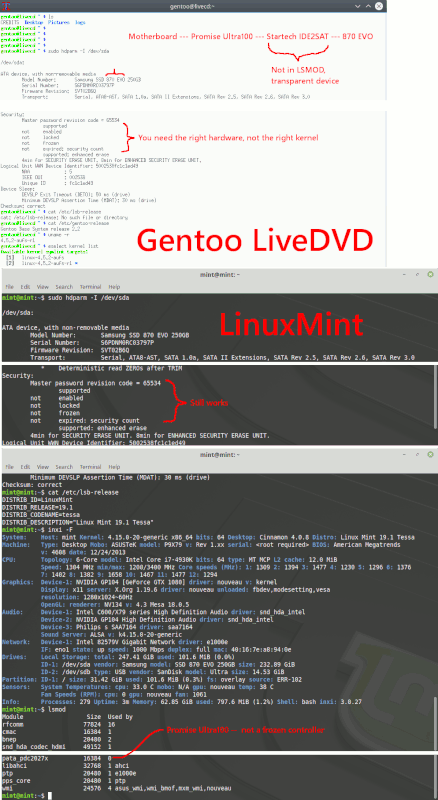
X79 ICH10 - booted my Gentoo install, emerged hdparm, hdparm -I /dev/sda, 870 EVO (250GB)
Master password revision code = 65534
supported
not enabled
not locked
frozen <------------------ Intel Motherboard ports are not good for this exercise
not expired: security count
supported: enhanced erase
Next, I installed a Promise Ultra100 IDE card, then
connected a Startech IDE2SAT adapter, plugged adapter
into Samsung 870 EVO SATA 250GB drive. Used two OSes
with no special kernel, got
Master password revision code = 65534
supported
not enabled
not locked
not frozen <------------------ This worked with a JMB363 IDE as well, plus the IDE2SAT adapter
not expired: security count
supported: enhanced erase
[Picture]
https://i.postimg.cc/28jRbJLN/unfrozen.gif
Paul
--- MBSE BBS v1.0.8 (Linux-x86_64)
* Origin: A noiseless patient Spider (2:250/1@fidonet)